
Claude Code Single Folder Setup: Folder Structure and Prompting Guide for Websites and Web Apps
Short answer
Claude Code works best when one project folder holds everything it needs: the codebase, a CLAUDE.md with project rules, requirements docs, and reusable prompt files. That structure can reduce unnecessary searches and provide useful context. It does not prevent incorrect edits or duplicate logic; review and tests remain necessary.
Claude Code can use a project folder that provides clear, structured context. By organizing your codebase, project instructions, comprehensive requirements documentation, and reusable prompt files into a single, cohesive folder system, you enable the AI coding agent to quickly read, edit, and navigate files with less unnecessary searching. Incorrect edits and duplicate logic remain possible and require review.
Why Folder Structure Matters in Claude Code
An agentic command-line tool like Claude Code has the autonomy to read your repository, execute build processes, and rewrite code. Without a defined folder system, the agent is forced to run broad search queries, which consumes excessive context window limits, inflates costs, and leads to code drift. Implementing a standardized folder layout yields several key benefits:
- Better Project Context: Claude Code understands the business and design rules immediately, resulting in highly accurate code suggestions.
- Fewer Hallucinated Files/Features: Restricting the search space prevents the agent from creating arbitrary utility files or redundant API endpoints.
- Easier Debugging: With clear separations between frontend, backend, and database files, diagnosing server crashes and visual bugs takes seconds.
- Easier Handover: Standard layouts make it simple for other developers or auxiliary agent frameworks to step in and continue work.
- Better Agency Workflow: Standardizing repositories enables development teams and freelancers to handle multiple client deliverables with consistent productivity.
- Better Repeatable Process: Create a robust software blueprint for all future client or in-house product launches to scale operations.
Quick Claude Code Installation Reference
Before structuring your project files, make sure Claude Code is successfully installed on your workstation. Be sure to check the official Anthropic Claude Code documentation for the latest command arguments. Here are the core installation options:
curl -fsSL https://claude.ai/install.sh | bashirm https://claude.ai/install.ps1 | iexcurl -fsSL https://claude.ai/install.cmd -o install.cmd && install.cmd && del install.cmdbrew install --cask claude-codewinget install Anthropic.ClaudeCodeAfter the installation completes, run the following verification checks in your terminal to ensure everything is initialized correctly:
claude --version
claude doctorRecommended Single-Folder System
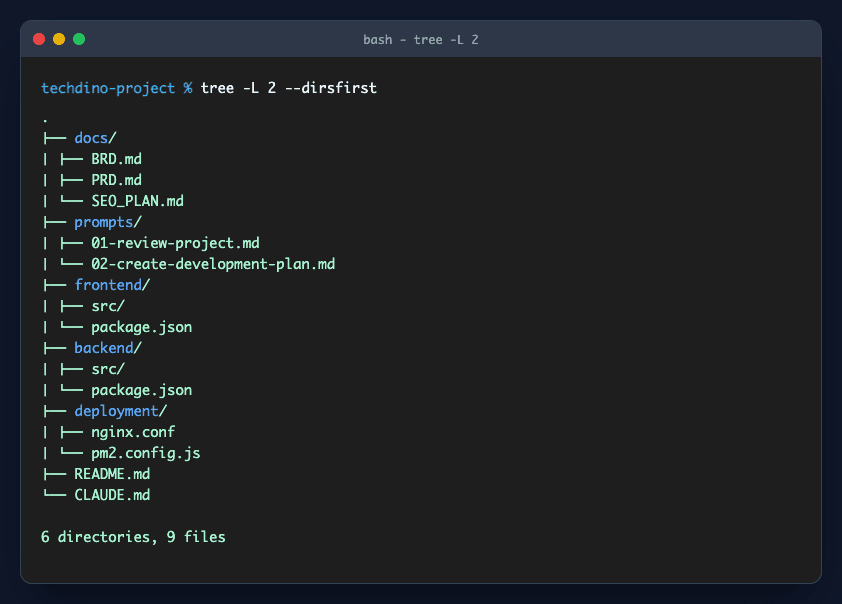
Single folder system for Claude Code projects
To build full-stack web applications and websites, organize your workspace into a unified structure. This structure lets Claude Code cross-reference server routes, client UI views, database migration schemas, and API documentation simultaneously:
my-project/
├── README.md
├── CLAUDE.md
├── .env.example
├── docs/
│   ├── BRD.md
│   ├── PRD.md
│   ├── FRD.md
│   ├── SRS.md
│   ├── USER_FLOW.md
│   ├── API_REQUIREMENTS.md
│   └── SEO_PLAN.md
├── prompts/
│   ├── 01-review-project.md
│   ├── 02-create-development-plan.md
│   ├── 03-build-landing-page.md
│   ├── 04-build-frontend.md
│   ├── 05-build-backend.md
│   ├── 06-fix-bugs.md
│   ├── 07-optimize-seo.md
│   ├── 08-test-application.md
│   └── 09-deploy-production.md
├── frontend/
│   ├── package.json
│   ├── src/
│   └── public/
├── backend/
│   ├── package.json
│   ├── src/
│   └── prisma/
├── database/
│   ├── schema.md
│   ├── seed-data.md
│   └── migrations/
├── assets/
│   ├── screenshots/
│   ├── logos/
│   ├── icons/
│   └── brand/
├── deployment/
│   ├── docker-compose.yml
│   ├── nginx.conf
│   ├── pm2.config.js
│   └── production-checklist.md
├── testing/
│   ├── test-cases.md
│   ├── bugs.md
│   └── qa-checklist.md
└── changelog/
└── CHANGELOG.md- README.md: Acts as the entry guide and high-level blueprint for the workspace.
- CLAUDE.md: Feeds critical instructions, styles, and command rules to the agent.
- docs: Holds business specs, functional requirements, and SEO strategy boards.
- prompts: Houses pre-written markdown prompts for different project stages.
- frontend: Contains user interfaces, landing pages, dynamic components, and styling files.
- backend: Hosts API controllers, routes, data validations, and database connectors.
- database: Stores local schemas, migrations, and mock data templates.
- assets: Stores brand assets, icons, screenshots, and visual guidelines.
- deployment: Includes reverse-proxy configs (Nginx), process configs (PM2), and checklists.
- testing: Catalogs test cases, QA logs, and unresolved development bugs.
- changelog: Keeps chronological logs of all added modules.
What to Write in README.md
The README.md is the starting reference. It should give Claude Code a quick summary of the project goal, stack details, and feature priorities:
# Project Name

## Goal
Build a production-ready website or web application for [business type].

## Target Users
* Customers (e.g. online booking, checkout)
* Admin users (e.g. CRM dashboard, metrics)
* Business owners (e.g. settings, reports)

## Main Features
* Homepage & public sections
* User authentication & role gates
* Dashboard statistics
* CRUD data management modules
* Transactional notifications
* SEO landing pages

## Tech Stack
* Frontend: Next.js (App Router), TypeScript, Tailwind CSS, Shadcn UI
* Backend: Node.js, Express.js, Prisma ORM
* Database: MySQL / PostgreSQL
* Deployment: Ubuntu VPS, Nginx, PM2, Docker

## Current Status
[State whether the project is brand new, has a partial backend setup, or needs a frontend rebuild].
What to Write in CLAUDE.md
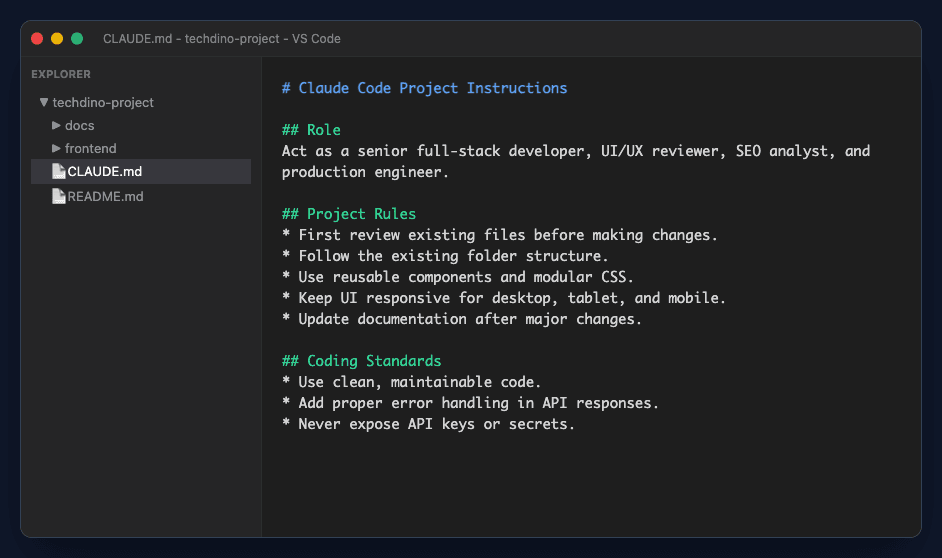
CLAUDE.md project instruction file example
The CLAUDE.md file is a local guidelines document. It outlines explicit agent constraints, visual standards, and expectations, stopping the agent from rewriting layout structures:
# Claude Code Project Instructions

## Role
Act as a senior full-stack developer, UI/UX reviewer, SEO analyst, and production engineer.

## Project Rules
* Review the existing file structure and specs before coding.
* Do not delete working components or logic without written reason.
* Adhere strictly to folder nesting and design tokens.
* Maintain fully responsive components across desktop, tablet, and mobile.
* Provide empty, loading, error, and success states for all interactive cards.
* Validate client and server inputs to block bad payloads.
* Keep SEO metadata up to date across all pages.
* Never expose API secrets; read from env variables.
* Document newly created scripts or config parameters.

## Coding Standards
* Write clean, typed, modular code.
* Avoid duplicating logic; abstract helper hooks.
* Incorporate error handling blocks on all async fetches.
* Deliver consistent JSON responses from endpoints.

## Response Format
After completing a task, reply with:
1. High-level summary of changes
2. Files modified or created
3. Exact command to test locally
4. Unresolved edge cases or next steps
The Best Prompt Flow for AI Coding Agents
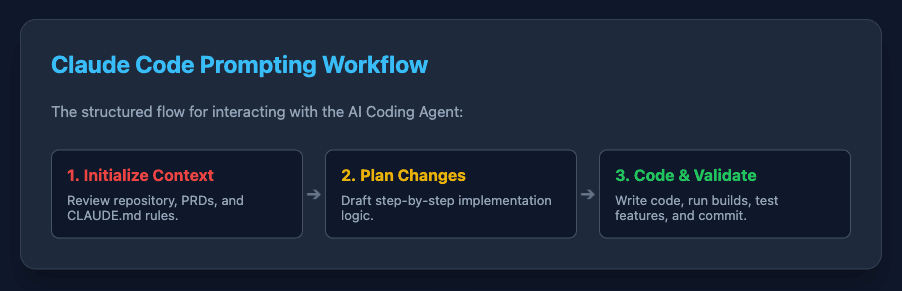
For best results, run your development in a structured workflow loop. Doing so ensures that each module is designed, validated, and debugged before the next layer is layered on top:
- 1. Review Project: Have the agent analyze requirements, structure, and files.
- 2. Create Plan: Produce a clean step-by-step implementation order.
- 3. Build UI Layout: Standardize theme CSS variables, layouts, and global typography.
- 4. Build Components: Construct individual buttons, forms, and cards.
- 5. Build Backend API: Create router files, controller logic, and schemas.
- 6. Connect APIs: Perform frontend fetch queries and bind state fields.
- 7. Add Validation: Integrate form validation and backend schema validation.
- 8. Add Role Access: Wire router guards and backend middleware permissions.
- 9. Add SEO: Set meta titles, meta descriptions, image alts, and JSON-LD markup.
- 10. Test: Execute local test suites and manually inspect UI rendering.
- 11. Fix Bugs: Debug console errors and runtime failures.
- 12. Prepare Deployment: Setup Nginx configurations, PM2 scripts, and ENV maps.
- 13. Update Docs: Record updates inside CHANGELOG.md and sitemaps.
Claude Code prompting workflow for websites and web applications
The Claude Code Reusable Prompt Cards
Save these prompts as markdown files inside your prompts/ directory. You can easily reference or copy-paste them in your command-line sessions to keep context clear:
1. First Project Review Prompt
Run this prompt immediately when launching Claude Code inside a new or existing repository to align it with the project parameters.
Review this complete project folder deeply. Read README.md, CLAUDE.md, docs, existing frontend, backend, database, deployment, testing files, and assets. Understand the business goal, current implementation, missing features, folder structure, and risks.

Do not start coding yet.

First give me:
1. Project understanding
2. Existing folder structure review
3. Missing files or documents
4. Feature gap analysis
5. Technical risks
6. Recommended development plan
7. Step-by-step implementation order2. Website Building Prompt
Use this prompt when building marketing layouts, landing pages, or public informational pages.
Build a production-ready website using this project folder context.

Before coding:
* Review README.md
* Review CLAUDE.md
* Review docs/SEO_PLAN.md
* Review assets/screenshots
* Review existing frontend structure

Then build:
* Responsive homepage layout
* Service details and feature grids
* Trust/Testimonial blocks
* Frequently Asked Questions layout
* Contact lead generation form
* Dynamic SEO metadata
* Fully responsive navigation header and footer

Rules:
* Rely on the pre-defined design system and tokens.
* Do not alter or break other routes.
* Implement clean semantic HTML5 containers.
* Optimize all image tags (lazy-loading, explicit dimension ratios).
* Provide a list of modified files and local preview testing steps.3. Web Application Building Prompt
Use this prompt when writing business dashboards, user profile portals, authentication routers, or admin panels.
Build a production-ready web application module by module using this project folder.

First review:
* README.md
* CLAUDE.md
* docs/FRD.md
* docs/SRS.md
* docs/USER_FLOW.md
* database/schema.md
* frontend/src
* backend/src

Then create a plan for:
* Authentication setup
* Customer admin dashboard
* User roles and dashboard gates
* Data lists and CRUD modules
* CSV/PDF report generators
* Integration with server APIs
* Form data validation models
* Global error handling blocks

Do not build everything at once. Implement one module at a time and explain:
1. What was built
2. Files changed/created
3. Command to trigger testing
4. What is pending for the next step4. Bug Fixing Prompt
Use this prompt when addressing server console warnings, visual overlaps, or API endpoint failures.
Review the project files and fix the reported bug.

Bug Description:
[Explain the bug here]

Steps to reproduce:
[Describe step-by-step how to trigger]

Expected behavior:
[Describe the expected output]

Actual behavior:
[Describe current bug symptoms or stack traces]

Rules:
* Find the exact root cause before altering files.
* Do not rewrite working modules.
* Introduce error handling or boundary catchers if absent.
* Show the code diff and list local verification commands.5. SEO Optimization Prompt
Use this prompt to carry out technical SEO audits and apply tag improvements before moving to production.
Review this website structure for SEO and conversion optimizations.

Review and audit:
* HTML title and description meta structures
* Heading structures (single H1, hierarchical H2s/H3s)
* Internal anchor navigation paths
* Alt properties on image tags
* Core Web Vitals checks (loading, responsiveness)
* JSON-LD schemas (BlogPosting, FAQPage, BreadcrumbList)
* sitemap.xml and robots.txt
* Lead conversion CTA buttons

Then implement the required optimizations without breaking the existing styling or layout.6. Deployment Prompt
Use this prompt when configuring production servers, reverse proxies, and continuous build scripts.
Configure this repository for production hosting.

Review:
* Production environment templates (.env.production)
* Build scripts and static output targets
* API base paths
* Database pool configurations
* CORS and cookie configurations
* Nginx site configurations
* PM2 ecosystem config files
* Health status API routes

Deliver:
1. Operational deployment checklist
2. Environment parameters list
3. Production CLI run commands
4. Post-deployment smoke test instructionsAgency and Product Development Workflows
For software agencies, managing multiple projects concurrently requires strict operational discipline. Implementing a single-folder workspace model helps standardize client projects:
- One Folder per Project: Keep client code, documentation, prompts, and deployment templates in a single dedicated monorepo repository.
- Keep docs and prompts inside the project: This ensures that any AI agent spawned (like Claude Code or Antigravity) immediately inherits the correct workspace memory.
- Use Git commits after each module: Make clean commits after completing components so you can rollback easily if an agent produces a bug.
- Keep screenshots in assets/screenshots: Useful for documenting visual progress, tracking updates, and carrying out audits.
- Keep deployment notes in deployment/: Clearly document server configs, Nginx reverse-proxies, PM2 targets, and SSL installation scripts.
- Keep bugs and QA in testing/: Maintain an active log of edge cases, bug reports, and verification steps.
- Standardize prompts: Keep prompt templates consistent across repositories to create a reliable and repeatable delivery process.
Frequently Asked Questions
Clear context and reusable prompts can help AI coding tools navigate a project. Review generated changes and run relevant tests; speed, cost and correctness improvements must be measured.
TechDino builds ready-made software products, custom websites, web applications, mobile apps, admin panels, AI agents, and automation systems for global clients. Need an expert engineering partner? Book a Free Demo or Chat on WhatsApp with us today.
The same discipline applies to the products we ship. Dino Business OS is built and maintained with this workflow, which is part of why the delivered source code is navigable by a team that did not write it.
Frequently Asked Questions
What is the best folder structure for Claude Code?
A monorepo-style single-folder setup containing a README.md, CLAUDE.md, and separate subdirectories for docs/, prompts/, frontend/, backend/, database/, testing/, and deployment/ works best. This keeps all context unified.
Why should I use CLAUDE.md?
CLAUDE.md acts as a project-specific guidelines manual. It defines the agent's persona, development limits, design rules, and file paths, ensuring the AI does not deviate from your tech stack.
Should I ask Claude Code to build the full app at once?
No. Asking the agent to build the full app at once leads to high token consumption, model confusion, and errors. Implement module-by-module. Ask it to review, plan, build one module, explain changes, and test before moving forward.
Can Claude Code build a full website?
Yes. When provided with an existing design framework, clear business goals (PRD), and structured prompting loops, Claude Code can construct production-ready websites.
Should I keep frontend and backend in one folder?
Yes, keeping frontend and backend projects under a single root directory allows the AI coding agent to write backend API routes and connect them to frontend elements in the same session.
What documents should I keep inside the project folder?
Store your Product Requirement Documents (PRD), Functional Requirement Documents (FRD), User Flow Diagrams, database schemas, and SEO roadmaps inside a dedicated 'docs' folder.
How does TechDino assist with AI-powered development?
TechDino designs and builds custom web apps, mobile apps, admin dashboards, and custom AI agent setups. We can build your next software product using advanced, automated development pipelines.
Explore Next
- See our ready-made white-label software products
- Learn about our AI agent development services
Need Setup or Custom Coding?
Get in touch to rebrand or customize our ready-made products, or discuss custom development services. All quotes are customized and private.
Related Articles
RAG Chatbot Development for Business Data: A Practical Guide
How RAG chatbots answer questions from your own documents and product data: architecture, vector databases, hallucination control, and where they pay off.
AI Agent vs Chatbot: What Actually Differs
A chatbot answers. An agent acts. The real difference is tool access and the ability to run multi-step work — not how conversational the replies sound.