 Loading TechDinoLoading TechDinoLoading TechDino
White-Label Digital News Portal & Short News App
Swipe-up short news platform, installable reader PWA, digital ePaper reader, and newsroom admin panel.
Built for: Digital Publishing, Short News, Local News
Frontend, backend, admin dashboard and database schema for the agreed scope — handed to you, not rented.
Business name, logo and app icons, Brand colour palette and typography, Your own domain and SSL certificate, Login, email and notification templates and more — applied before handover.
A standard branded deployment is estimated at approximately 2 weeks after the scope, brand assets, hosting access and required service credentials are confirmed. The estimate covers agreed branding, environment setup, supported integration configuration, supplied-data migration, testing and handover. Actual timing depends on product scope, data readiness, client approvals and third-party dependencies. Custom modules and new integrations are quoted separately; the written project schedule governs delivery.
InstNews is a ready-made short-news publishing platform for local newspapers, regional publishers and digital news startups, with swipe-up short news cards, a digital ePaper reader, an editorial newsroom, a responsive reader portal and an installable PWA. Complete source code for the agreed scope, migration assistance and three months of technical support are included; setup is estimated at approximately two weeks after assets and access are confirmed.
InstNews is a ready-made digital news publishing platform for local newspapers, regional publishers, community news organisations and news startups. It combines a responsive public reader portal, a swipe-up Short News feed, a digital ePaper module and an editorial newsroom CMS with reporter, writer and editor roles. Readers install the progressive web app and receive web push alerts; publishers monetise with Google AdSense and track audiences with Google Analytics. Server-rendered article pages, news sitemaps and schema markup support search visibility in Telugu, Hindi, Tamil, Kannada, English and other languages. Native Android and iOS apps are optional add-ons. Complete source code and white-label deployment are included for publishers in India, the Gulf and the diaspora.
Newspapers, regional news publishers, community news organisations, digital media startups, Telugu news publishers, local district news portals, online magazines, and media resellers.
InstNews is delivered with the complete source code included in the agreed product scope — frontend, backend, admin dashboard, database schema and any applicable mobile application code. Source-code access, licensing rights and ownership terms are set out in the applicable purchase or licence agreement, so the delivered application can be maintained and extended by your own team.
Source-code access, copyright and licensing rightsInstNews runs on hosting you control — your own VPS, cloud account or existing infrastructure — rather than on a vendor platform. Deployment, database setup and migration assistance are included, and there is no mandatory monthly platform fee attached to the software itself. Third-party services such as payment gateways, SMS providers and hosting are billed by those providers directly.
Self-hosted deployment optionsInstNews can use your name, logo, colour scheme, domain and applicable templates; app-store assets apply where a mobile application is in scope. A standard branded deployment is estimated in approximately 2 weeks after scope and required assets are confirmed, subject to client approvals, data readiness, third-party dependencies and the written schedule.
What white-label customization coversAgencies, studios and IT partners can take InstNews to their own clients under their own brand. Licensing terms for reselling, the number of deployments permitted and any ongoing support arrangement are defined in the applicable agreement before the engagement starts.
Reseller and partner arrangementsInstNews is delivered as the 5 applications below. Each one is part of the purchase scope.
Optional add-ons: Android application, iOS application. These are not part of the standard package and are quoted separately.
A standard branded deployment is estimated at approximately 2 weeks after the scope, brand assets, hosting access and required service credentials are confirmed. The estimate covers agreed branding, environment setup, supported integration configuration, supplied-data migration, testing and handover. Actual timing depends on product scope, data readiness, client approvals and third-party dependencies. Custom modules and new integrations are quoted separately; the written project schedule governs delivery.
Scope confirmation, logo, colour palette, domain, company details and the integration credentials you want configured.
Brand identity, theme colours, typography, app icons, email and notification templates applied across every included interface.
Server or cloud deployment, domain and SSL, database setup, payment gateway, SMS, email and maps configuration.
Migration of supplied data, walkthrough testing, source-code handover, documentation and admin training. Three months of technical support starts here.
Offer a modern mobile-first swipe-up Short News experience that appeals to younger readers.
Provide an interactive digital ePaper reader with page navigation and archive options.
Coordinate reporters, writers, and editors through a secure, structured admin newsroom.
Offer an installable Progressive Web Application (PWA) with push notifications.
Optimize search engine ranking using server-rendered content, news sitemaps, and Schema markup.
Retain readers with related articles, saved stories, breaking news tickers, and ads.
Every module below ships pre-built and is configurable during white-label setup.
Concise, mobile-friendly vertical news cards that readers swipe through to stay informed in under a minute.
Upload, organize, and publish digital editions of physical newspapers with zoom and date archives.
Admin-only workspace for creating, reviewing, scheduling, and publishing full articles and Short News.
Modern homepage with category sections, breaking news ticker, search, trending content, and ad slots.
Enable readers to install the news application on mobile and desktop directly from their browsers.
Fully custom logo, colors, fonts, category navigation, social sharing cards, and domains.
Click any image for a full-resolution preview.
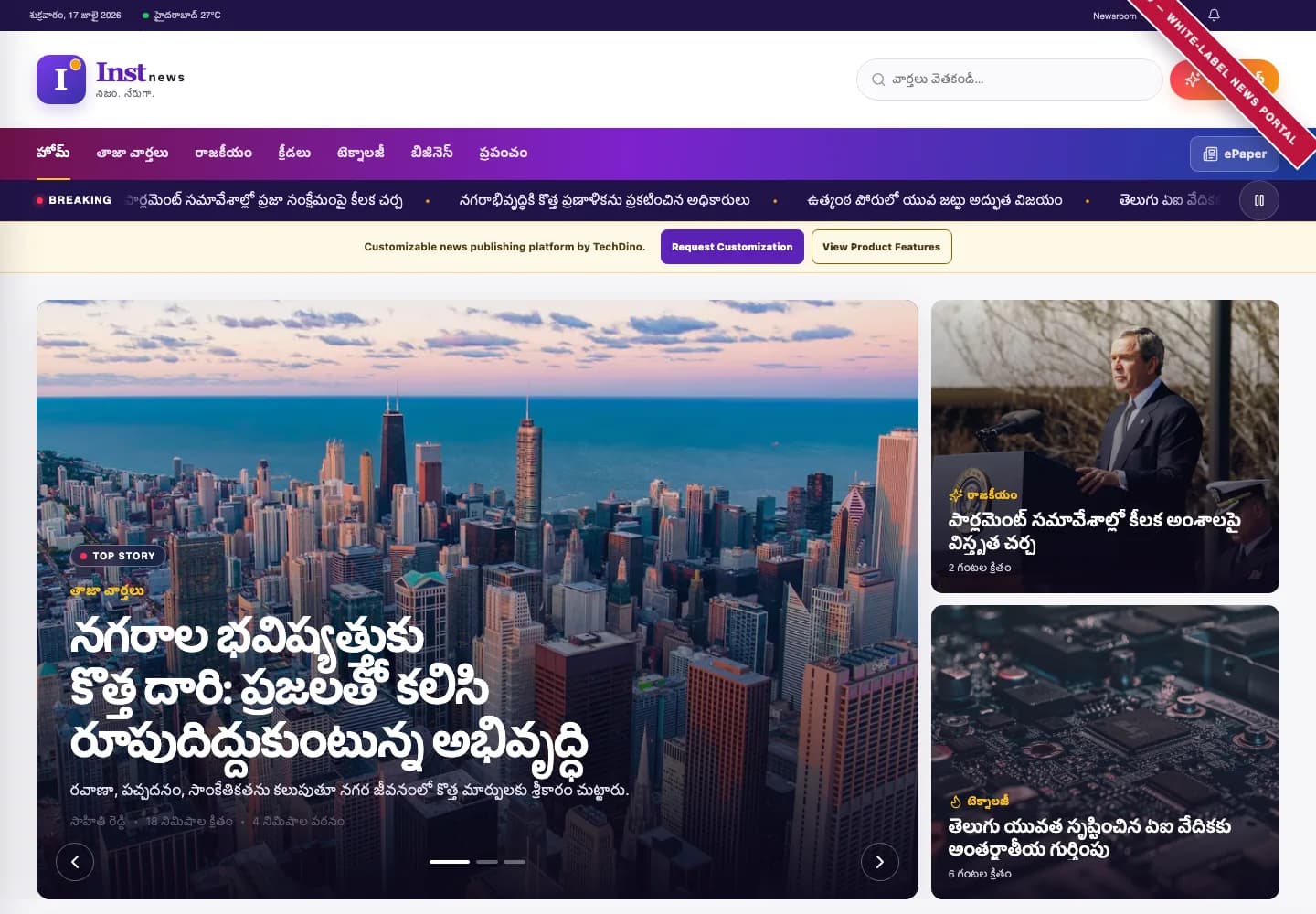
నగరాల భవిష్యత్తుకు కొత్త దారి: ప్రజలతో కలిసి రూపుదిద్దుకుంటున్న అభివృద్ధి — home page (Desktop)
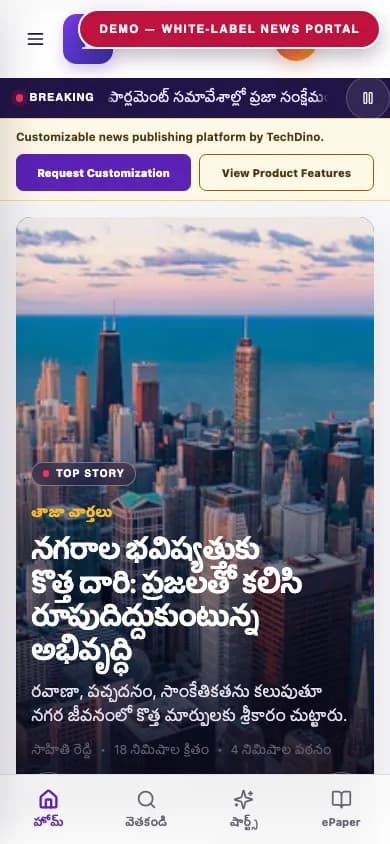
నగరాల భవిష్యత్తుకు కొత్త దారి: ప్రజలతో కలిసి రూపుదిద్దుకుంటున్న అభివృద్ధి — home page (Mobile)
నగరాల భవిష్యత్తుకు కొత్త దారి: ప్రజలతో కలిసి రూపుదిద్దుకుంటున్న అభివృద్ధి — shorts (Desktop)
తాజా వార్తలు — category latest (Desktop)
రాజకీయం — category politics (Desktop)
End-to-end workflow across Reader, Content Writer, Newsroom Editor, Admin.
Reader, Content Writer, Newsroom Editor, Admin
Swipe-Up Short News, Digital ePaper Module, Editorial Newsroom CMS, Responsive Reader Portal, Installable PWA
PWA Web Push, Google AdSense, Google Analytics
Reader Analytics, Trending Short News, Category Traffic
After purchase, you receive the complete source code for the agreed project scope. Branding, basic setup, deployment and migration assistance are included as agreed. A standard branded setup is estimated at approximately 2 weeks after required assets and access are confirmed, subject to the written schedule and third-party dependencies. Three months of technical support starts on the confirmed delivery date.
TechDino provides basic migration and deployment assistance to help move the application to the customer's server, VPS, cloud hosting or supported hosting environment. This includes environment setup guidance, database migration, application build guidance and basic deployment verification.
Every TechDino project includes three months of technical support from the confirmed delivery date. This support covers installation guidance, deployment-related assistance, configuration help, clarification of the existing codebase and correction of verified issues within the delivered project scope.
Additional development, custom features and support after the included three-month period can be provided under a separate support or development agreement.
The customer receives the complete source code included in the agreed product scope. The application can be deployed under the customer's brand, domain and hosting environment. The customer can maintain, extend and customize the delivered application according to the applicable purchase or licence agreement.
Scope for InstNews: Applicable source code, database schema, included migrations, and setup documentation are provided for the applications and modules listed in the agreed purchase scope. Licence type: Commercial License / Software Grant.
Usage, copyright and resale termsNothing ships carrying the TechDino name. Every surface a customer or staff member sees is rebranded to your business before handover, and because the source code is yours, your own team can change anything afterwards.
Toggle between our base demo branding and a customized client launch build.
Custom Corporate Palette
Client Custom Domain
Published Under Your Account
Evaluating ready-made software against custom development from scratch or recurring monthly SaaS subscriptions.
Delivery is coordinated remotely from Hyderabad. Currency, language, hosting and payment requirements are reviewed against this product’s included scope.
Scope INR billing, tax fields, gateway credentials and India hosting requirements for this product. Only the integrations listed in the agreed scope are included.
India Market DetailsReview USD/CAD billing, payment-provider eligibility and your preferred hosting country. Gateway and infrastructure choices depend on the product and agreed scope.
USA Market DetailsConfirm AED/SAR billing, language requirements, supported gateways and the exact hosting country. Arabic interfaces and new integrations are separately scoped where not included.
UAE Market DetailsReview GBP/EUR billing, payment providers, export needs and the required hosting country. Hosting alone does not establish regulatory compliance.
UK Market DetailsConfirm AUD/SGD billing, gateway availability and your required hosting country. Payment and deployment options are reviewed for the actual application.
Australia Market DetailsExplore target markets and discuss payment, tax, timezone and hosting requirements for your deployment.
InstNews is a ready-made white-label digital news publishing platform for newspapers, local publishers, regional media companies, community news organisations and digital news startups. It combines a responsive public news portal, swipe-up Short News, digital ePaper and a controlled editorial newsroom under one customizable brand.
Yes. InstNews specializes in swipe-up Short News, digital ePaper and a modern editorial newsroom, whereas Dino News remains a traditional news publishing platform focusing on standard articles and reader mobile apps. Both products are independent and licensed separately.
It is an app-like vertical news-reading experience where readers can quickly move from one story to another by swiping upward on mobile or using the mouse wheel on desktop. It transforms important updates into concise story cards.
Yes. Readers can swipe up on mobile or scroll on desktop to move to the next story. They can also swipe down or scroll up to go back, view the essential summary, and open the full article when they need more detail.
Yes. It includes a dedicated digital ePaper publisher where you can upload and organize digital editions of physical newspapers, allowing readers to browse today's paper or archives with date/region filters, zoom controls, and full-screen reading.
Yes. The Newsroom is a secure administrative workspace for creating, reviewing, scheduling, and publishing content. It supports role-based permissions (Author, Editor, Admin), drafts, audit logs, media library, and SEO metadata.
No. Public portal users are readers only and have read-only access. All article creation and publishing must happen through the authorized newsroom CMS by authenticated staff.
Yes. Articles can be published immediately or scheduled to go live at a specific date and time automatically.
Yes. The newsroom CMS has a dedicated section to create, edit, and publish Short News cards independently or link them to full articles.
Yes. The platform is fully white-labeled. You can customize the publication name, logo, domain, favicon, brand colors, fonts, categories, navigation, and settings.
Yes. It is fully configurable to support languages like English, Telugu, Hindi, Tamil, Kannada, Malayalam, Marathi, Bengali, Gujarati, Urdu, and Arabic.
Yes. It supports geographic news hierarchies (Country, State, District, City, Constituency, Mandal/Taluk, Neighborhood) so you can organize regional coverage.
Yes. It includes Progressive Web App (PWA) capability, allowing readers to install the application on their home screens on iOS, Android, macOS, and Windows.
Yes. Native Android and iOS reader applications are available as optional customizations on top of the base PWA product.
Yes. Reader polls and moderated comments can be integrated as optional bespoke modifications.
Yes. Paywall models, premium content, and subscriber billing integrations are available as optional bespoke add-ons.
Yes. The platform has pre-integrated advertisement spaces (header, sidebar, in-article, short news overlays) which can be configured with Google AdSense or custom banners.
Yes. We offer legacy content and archived ePaper migration as an optional customization service.
Yes. You can purchase a complete source-code license (Next.js portal, admin CMS, Node.js API, database schema) for full data ownership and hosting freedom.
Send your requirement through the enquiry form on this page and the conversation continues directly on WhatsApp with TechDino.
Yes. You receive the complete source code included in the agreed project scope, including the available frontend, backend, admin dashboard, database schema and applicable mobile application source code.
Three months of technical support is included from the confirmed project delivery date.
A standard branded deployment is estimated at approximately 2 weeks after the scope, brand assets, hosting access and required service credentials are confirmed. The estimate covers agreed branding, environment setup, supported integration configuration, supplied-data migration, testing and handover. Actual timing depends on product scope, data readiness, client approvals and third-party dependencies. Custom modules and new integrations are quoted separately; the written project schedule governs delivery.
No. Hosting, domain registration, SMS, email, maps, payment gateways and other paid third-party services are separate.
Yes. New features and major customizations can be developed under a separate quotation based on the required scope.
No. Every purchase is quoted on scope: product, branding, deployment target, integrations and customisation. Share your requirement on WhatsApp or the contact form and TechDino returns a written quotation after a walkthrough.
InstNews ships as a web and progressive web application. Native mobile builds are an optional add-on quoted separately, so mobile source code is delivered only when the agreed package includes it.
White-Label News Portal & Editorial CMS
View productWhite-Label OTT Platform with Web, Mobile and Smart TV Apps
View productHow a regional newspaper moves online without losing the print edition: swipe-up short news cards, a digital ePaper reader, an editorial newsroom and an installable PWA — as delivered in InstNews.
Read the guideCompare high-speed Next.js news portals and swipeable short news apps against legacy WordPress sites for media monetization and reader engagement.
Read the guideSource code for the agreed scope, migration assistance and three months of technical support, delivered by TechDino.
Or Chat Directly on WhatsAppTell us what you want to launch. Prepare a WhatsApp message for Nayesh. Response time depends on availability.