
AI Agent vs Chatbot: What Actually Differs
Short answer
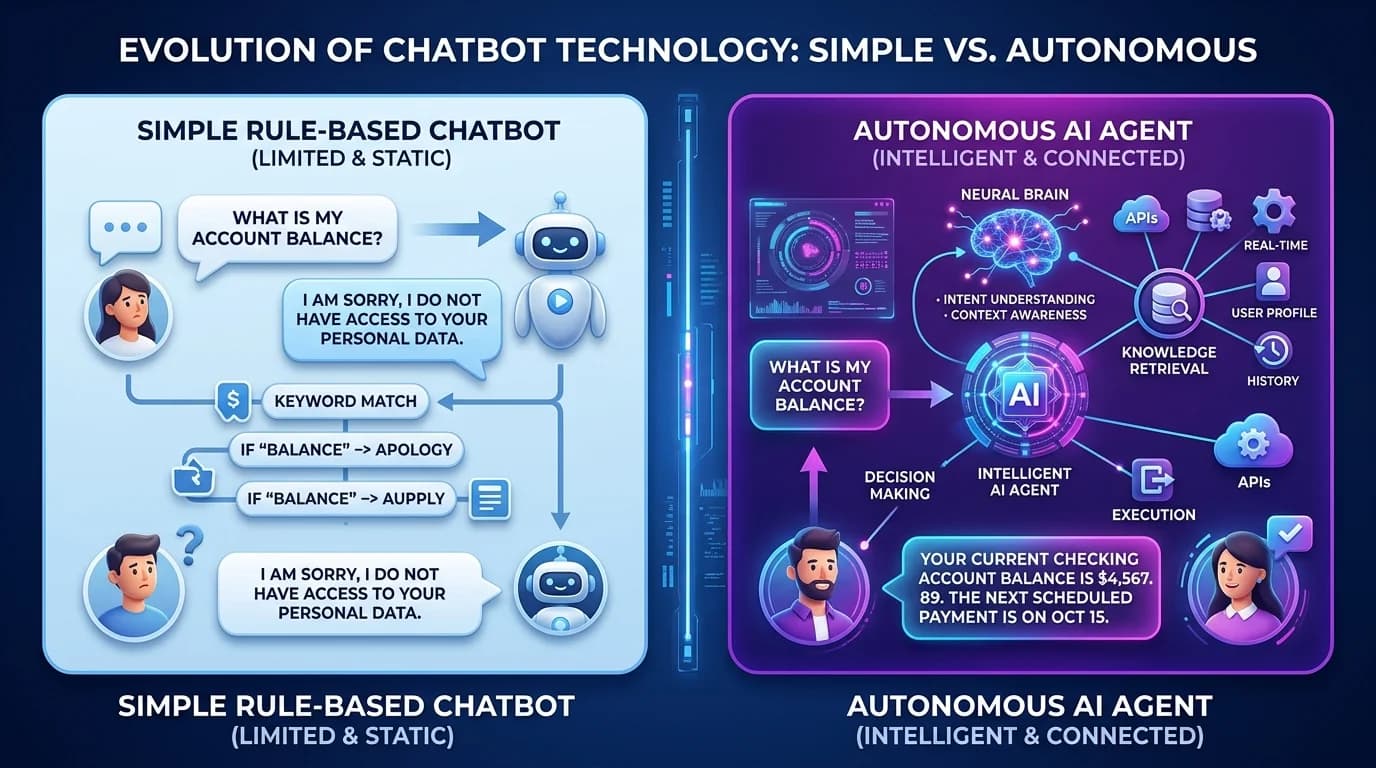
A chatbot responds to messages with text. An AI agent responds and then acts — it can call tools, query systems, and run a multi-step task to completion before reporting back. The dividing line is tool access and autonomy, not conversational quality. A chatbot tells a customer the refund policy; an agent checks the order and issues the refund.
The words get used interchangeably in marketing copy, which makes scoping conversations harder than they need to be. The distinction is not subtle once you look at what the system is allowed to do.
What a Chatbot Does
A chatbot takes a message and returns a message. Everything it produces is text. Older chatbots matched keywords against scripted replies; modern ones use a language model, and the good ones ground answers in your own documents through retrieval — that is what a RAG chatbot is. Retrieval can make answers more specific to your business, but relevant documents, permissions and answer verification are still needed. It does not change the shape of the output: still text, still one turn at a time.
This is the right tool for a large class of problems. Answering policy questions, explaining products, searching internal documentation, qualifying an enquiry before a human picks it up — none of these require the system to change anything.
What an AI Agent Does
An agent is given tools — functions it can call — and a goal. It decides which tools to use, in what order, reads the results, and keeps going until the task is done or it hits a limit. The tools are ordinary software: a database query, an API call, a file write, an email send.
That loop is the whole difference. A chatbot produces an answer in one step. An agent plans, acts, observes what happened, and adjusts — which is why it can complete work rather than describe it.
| Chatbot | AI agent | |
|---|---|---|
| Output | Text reply | Text reply plus real actions in other systems |
| Tool access | None, or retrieval only | Database, APIs, files, email, internal services |
| Steps per request | One turn | Many, until the goal is met |
| State | Conversation history | Conversation history plus task state across steps |
| Failure mode | A wrong or vague answer | A wrong action — which is why permissions and logging matter |
| Typical use | Support answers, document search, lead qualification | Ticket triage, data entry, reconciliation, report generation, multi-system workflows |
| Build complexity | Lower | Higher — needs tool definitions, permissions, error handling and audit trails |
A Concrete Example
A customer writes: "My order hasn't arrived and I want a refund."
- A scripted chatbot returns the refund policy text. The customer still has to open a ticket.
- A RAG chatbot returns the refund policy accurately, quoting your actual terms rather than a generic answer. The customer still has to open a ticket.
- An agent looks up the order, checks the shipment status against the courier API, confirms it is past the delivery window, applies the refund rule, issues the refund, and replies with the confirmation reference. No ticket exists because nothing was left for a human to do.
Notice that the first two are not failures. If your refund rules require human judgement, the chatbot answer is the correct design and the agent is a liability.
Which One Does Your Business Need?
Work backwards from what has to change at the end of the interaction.
- Nothing changes in any system — the user just needs to know something. Build a chatbot, and ground it in your documents so the answers are yours and not generic.
- Something must change in a system, and the rules are unambiguous enough to encode. An agent is worth the extra build.
- Something must change, but the decision needs judgement, carries legal weight, or moves significant money. Use an agent that prepares the action and a human who approves it.
- You are unsure. Start with retrieval-grounded answers, log what people actually ask for, and add tools to the top three repeated requests. This is cheaper than guessing which agent to build.
What Makes Agents Harder to Build
A chatbot that gets an answer wrong is embarrassing. An agent that gets an action wrong has changed your data. That difference drives every extra requirement:
- Scoped permissions — each tool gets the narrowest access that works, so a bad decision has a small blast radius.
- Audit logging — every tool call recorded with inputs, outputs and timestamps, so any action can be traced and reversed.
- Confirmation gates — irreversible or high-value operations pause for human approval.
- Step and cost limits — a loop that cannot terminate must be stopped by the framework, not by hope.
- Failure handling — tools time out and APIs return errors; the agent needs a defined behaviour for that, not a retry loop.
This is why an agent project is not a chatbot project with a bigger prompt. Most of the engineering sits in the tool layer and the guardrails, not the model.
Where RAG Fits
Retrieval-augmented generation is not a third category — it is a technique both use. A chatbot uses retrieval to answer from your documents instead of the model's general knowledge. An agent uses the same retrieval as one of its tools, alongside the ones that take action. If you already have a RAG chatbot, you have built part of an agent: the knowledge tool. See RAG chatbot development for business data for how that layer is built.
If you are scoping either one, contact TechDino — the useful first conversation is about which actions need to happen automatically, not which model to use.
If you want to see the distinction running rather than described, Dino Business OS ships a multi-agent assistant that answers from permission-scoped company records, and Dino HRMS applies the same pattern to HR data. Both are sold with complete source code, so the agent logic is yours to inspect and change.
Frequently Asked Questions
What is the main difference between an AI agent and a chatbot?
A chatbot returns text. An AI agent can call tools — databases, APIs, files, email — to take real actions and run a task across multiple steps until it is complete. Tool access and autonomy are the dividing line, not how natural the conversation sounds.
Is a RAG chatbot an AI agent?
No. A RAG chatbot retrieves from your documents to ground its answers, with accuracy still requiring evaluation, but its output is still an answer. It becomes agent-like only when retrieval is one tool among others that change data or trigger processes.
Are AI agents more expensive to build than chatbots?
Generally yes. The model work is comparable; the extra cost sits in defining tools, scoping permissions, audit logging, confirmation gates and failure handling — all of which exist because an agent can change your data, and a chatbot cannot.
Can an AI agent replace customer support staff?
It can close the repetitive, rule-based cases end to end — status checks, standard refunds, appointment changes. Cases needing judgement, exceptions or empathy still route to people. In practice agents reduce ticket volume rather than eliminate the team.
Should I start with a chatbot or an agent?
Start with a retrieval-grounded chatbot unless you already know exactly which action must be automated. Logging real questions for a few weeks tells you which tools are worth building, which is cheaper than guessing at an agent design first.
How do you stop an AI agent doing something wrong?
With engineering, not prompting. Give each tool the narrowest permission that works, log every call, require human approval for irreversible or high-value actions, and cap steps and spend at the framework level so a stuck loop terminates.
Explore Next
- See our PropertyApp AI real estate platform
- Learn about our AI agent development services
Need Setup or Custom Coding?
Get in touch to rebrand or customize our ready-made products, or discuss custom development services. All quotes are customized and private.
Related Articles
RAG Chatbot Development for Business Data: A Practical Guide
How RAG chatbots answer questions from your own documents and product data: architecture, vector databases, hallucination control, and where they pay off.
Claude Code Single Folder Setup: Folder Structure and Prompting Guide for Websites and Web Apps
Learn how to organize a Claude Code project folder with README, CLAUDE.md, docs, prompts, frontend, backend, testing, deployment files, and reusable prompts to build websites and web apps faster.