
Permission-Aware AI Agents for Project Management: Approvals, Read-Only Mode and Audit Trails
Short answer
Safe AI agents in project management act as the signed-in user, ask before bulk changes, can be set to read-only, run automations as a named owner with limits, keep provider keys encrypted and leave an audit trail. DinoFlow applies each control, and the checklist below lets you test any AI project tool against them.
Why Agent Safety Is a Project Management Problem
A project tool holds budgets, client names, risks and personnel plans. An AI agent that can change that data is useful because it can act, and risky for the same reason. Safety is therefore a design question about access, approval and traceability, not only about model quality.
Five Risks and the Control for Each
| Risk | Control | How DinoFlow applies it |
|---|---|---|
| Agent sees more than the user should | Run agent actions as the user | Every tool call goes through the DinoFlow API with the asker's permissions |
| Unreviewed bulk changes | Ask before applying | Agents ask for approval before bulk changes, such as triaging several requests at once |
| Accidental edits by an exploratory agent | Read-only mode | Agents can be limited to read-only tools |
| Unattended automation going wrong | Named owner, limits and history | Rules that run agents act as the rule owner, recheck permissions on every event and keep a run history |
| Leaked credentials or runaway cost | Encrypted keys and a budget | Provider keys are encrypted at rest and a monthly token budget caps usage |
Scope-Based Roles Come First
Agent permissions are only as good as the permission model underneath. DinoFlow composes roles from fine-grained permissions and scopes each to the person's own work, their team, department, project or the whole workspace. Guests see only the projects they are invited to, with the role assigned for that project.
Limits on Automation Rules
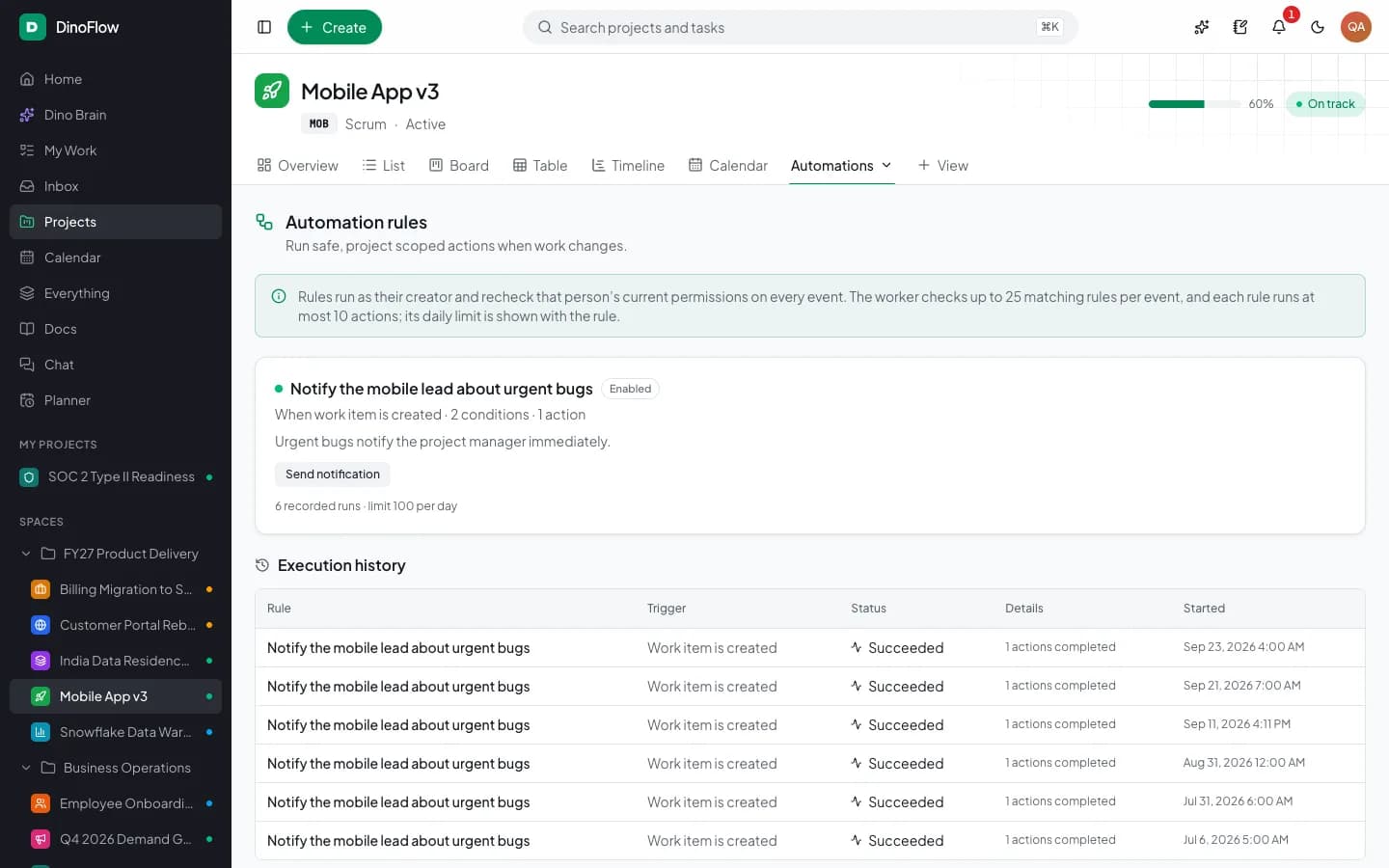
Automations pair a trigger, conditions and actions, and can include an AI step. The rule runner checks up to 25 matching rules per event, each rule runs at most 10 actions and a daily limit is shown with the rule. Every execution is recorded in a history with its trigger, status and time, so a surprising change can be traced to a rule.
Audit Trails and Sign-In Security
Sensitive changes are recorded with who, what and when, and administrators can filter by actor, action and entity and export to CSV. Local accounts can use authenticator-app two-factor codes, and single sign-on is available through OpenID Connect and SAML.
A Checklist for Evaluating Any AI Project Tool
- Does the agent act with the asking user's permissions, or with a shared service account?
- Does it ask before changing many items at once?
- Can agents be restricted to read-only?
- Who does an unattended automation run as, and is that person's access rechecked?
- Is there a per-rule limit and a run history?
- Where are provider keys stored, and are they encrypted?
- Can you cap and see AI spend by person and feature?
- Can you export an audit log?
Frequently Asked Questions
Frequently Asked Questions
Can an AI agent change tasks without asking?
In DinoFlow, agents can create and update individual work but ask for approval before bulk changes, and they can be switched to read-only. Automation rules that run an agent do so as the rule owner with a recorded history.
Does the AI use its own admin account?
No. Each tool call goes through the DinoFlow API as the signed-in person, so the agent can see and change only what that person could.
How can I limit AI cost in a project management tool?
Use your own provider key, assign cheaper models to routine jobs and set a monthly token budget. DinoFlow's usage dashboard shows spend, tokens, latency and success rate by model, feature and person.
Explore Next
- See our DinoFlow AI agents and automations
- Learn about our AI agent development
Need Setup or Custom Coding?
Get in touch to rebrand or customize our ready-made products, or discuss custom development services. All quotes are customized and private.
Related Articles
AI Task Triage: From Intake Form to Assigned Work With Automation Rules
How AI task triage works: intake forms and chat messages become tasks, Dino Brain proposes priority and owner, and automation rules repeat the triage with limits and a run history.
AI Sprint Planning: Backlog Ranking, Team Capacity and Approval Before Changes
How AI sprint planning works in practice: rank the backlog, fit work to team capacity, review the proposed sprint and approve changes before they apply.