
AI Sprint Planning: Backlog Ranking, Team Capacity and Approval Before Changes
Short answer
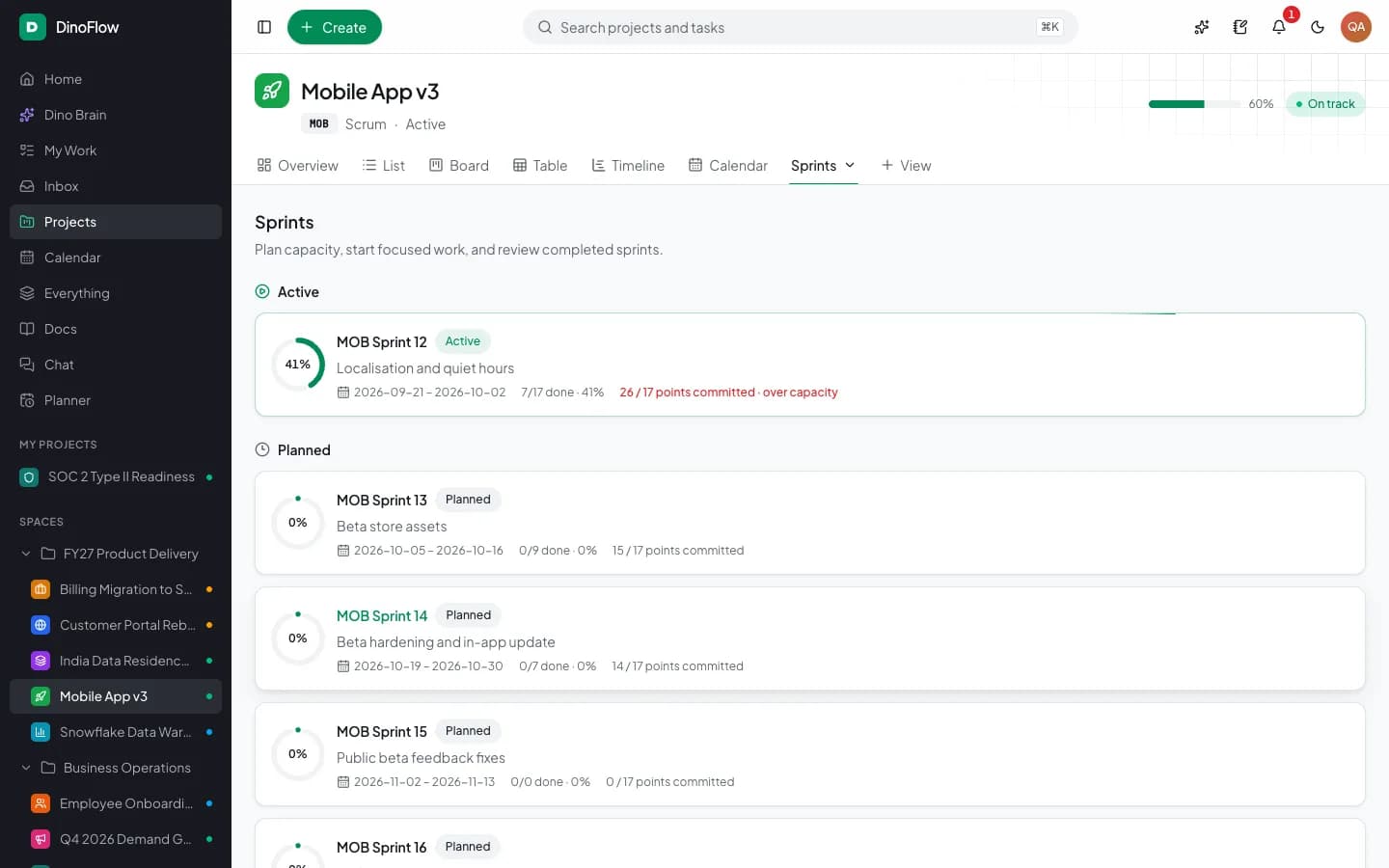
AI sprint planning proposes which backlog items fit the next sprint by comparing their size with team capacity, then waits for a person to approve. In DinoFlow, a Planning and Sprints agent lists sprints, creates one and adds work to it, while the workload view shows capacity by person and week.
What AI Sprint Planning Does and Does Not Do
Sprint planning is a trade-off between what the team wants to build and what it has time to build. AI helps by doing the arithmetic and the bookkeeping: it reads the ranked backlog, compares estimates with capacity, proposes a sprint and moves the chosen items. It does not decide priorities. The product owner still ranks the backlog, and a person still approves the plan.
The Inputs a Good Sprint Plan Needs
An AI agent can only plan as well as the data it reads. The table lists what a sprint plan depends on and where each input lives in DinoFlow.
| Input | Where it lives in DinoFlow | Why it matters |
|---|---|---|
| Ranked backlog with readiness | Backlog view of the project | Decides what the plan should pull first |
| Estimates | Points on each work item, summed per sprint as points committed | Sizes the sprint against capacity |
| Team capacity | Workload view, hours per person per week | Shows who has room and who is over capacity |
| Time off and holidays | Who is out and company holidays | Removes capacity that is not really there |
| Sprint load | Sprints page with committed points and progress | Flags a sprint whose commitment exceeds its capacity |
Plan a Sprint With Dino Brain, Step by Step
- 1. Rank the backlog and mark which items are ready.
- 2. Open Dino Brain and ask for a plan, for example: Plan the next sprint within team capacity.
- 3. The supervisor routes the request to the Planning and Sprints agent, which lists sprints, creates one and proposes items to add.
- 4. Review the proposed changes. Agents ask for approval before bulk changes, so nothing moves until you agree.
- 5. Start the sprint and follow progress and burndown.
- 6. Complete the sprint. Unfinished work rolls back to the backlog.
Check the Plan Against Real Capacity
The proposed sprint is only a draft until it is checked against capacity. The workload view totals hours per person per week, counts people allocated above their capacity and counts work that has no owner. The sprints page shows points committed against capacity and marks a sprint that is over capacity, so a plan that looks full on paper but ignores holidays is easy to spot.
Follow the Sprint With Reports
The Reports and Time agent can produce a project report, list blockers and show burn-up, so a daily stand-up can start from facts rather than from memory. Burndown and velocity are available on the project, and an AI summary on the project overview describes how many items are open, how many are past due and where work is sitting in the flow.
Sprint Planning Checklist
- Is every candidate item estimated and marked ready?
- Does the sprint commitment stay at or below capacity after time off?
- Are blocked items and dependencies visible before the sprint starts?
- Did a person approve the changes the agent proposed?
- Is there a plan for unfinished work when the sprint closes?
Frequently Asked Questions
Frequently Asked Questions
Can AI plan a sprint automatically?
It can propose one. In DinoFlow the Planning and Sprints agent lists sprints, creates a sprint and adds work to it, and agents ask for approval before bulk changes, so a person confirms the plan.
Does DinoFlow support Kanban as well as Scrum?
Yes. Projects are set up with a methodology such as Scrum, Kanban or Waterfall, and the same work can be shown as a board, list, table, timeline or calendar.
What happens to unfinished work when a sprint ends?
Completing a sprint rolls unfinished work back to the backlog, where it can be re-ranked and pulled into the next sprint.
Explore Next
- See our DinoFlow sprint planning and workload
- Learn about our AI agent development
Need Setup or Custom Coding?
Get in touch to rebrand or customize our ready-made products, or discuss custom development services. All quotes are customized and private.
Related Articles
AI-Powered Project Management Software: How Agents, Permissions and Self-Hosting Fit Together
How AI-powered project management software is built: a supervisor with specialist agents, permission-aware tool calls, cited knowledge search, model choice and a self-hosted deployment.
AI Task Triage: From Intake Form to Assigned Work With Automation Rules
How AI task triage works: intake forms and chat messages become tasks, Dino Brain proposes priority and owner, and automation rules repeat the triage with limits and a run history.