
Dino Pharmacy POS — White-Label Pharmacy Billing, Inventory & GST Software
White-Label Pharmacy POS & Billing Software for Indian Pharmacies
Dino Pharmacy POS is white-label pharmacy software for India with keyboard-first counter billing on FEFO batches, supervisor approvals, split tenders, GST invoices in A4, 80 mm and 58 mm, batch and expiry stock with quarantine and cold-chain holds, Schedule H/H1/X prescription workflows, purchasing with three-way match, finance, reports and a Flutter Android app.
Built for: Retail Pharmacies & Chemists, Multi-Counter Medical Stores, Hospital & Clinic Pharmacies, Pharmacy Chains & Franchise Groups
- Complete Source Code
- Fully Brand-Customizable
- 2-Week Setup Estimate
- Migration Assistance
- 3 Months Support
- Mobile App Included
Complete source code
Frontend, backend, admin dashboard and database schema for the agreed scope — handed to you, not rented.
Fully customizable to your brand
Business name, logo and app icons, Brand colour palette and typography, Your own domain and SSL certificate, Login, email and notification templates and more — applied before handover.
2-Week Setup Estimate
A standard branded deployment is estimated at approximately 2 weeks after the scope, brand assets, hosting access and required service credentials are confirmed. The estimate covers agreed branding, environment setup, supported integration configuration, supplied-data migration, testing and handover. Actual timing depends on product scope, data readiness, client approvals and third-party dependencies. Custom modules and new integrations are quoted separately; the written project schedule governs delivery.
Dino Pharmacy POS is white-label pharmacy software from TechDino for Indian retail pharmacies, covering FEFO counter billing, GST invoices, batch and expiry stock, Schedule H/H1/X workflows with pharmacist sign-off, purchasing, finance and reports, plus a Flutter Android app. Buyers receive source code for the agreed scope, migration assistance and three months of technical support; setup is estimated at approximately two weeks.
What is Dino Pharmacy POS?
- Launch window
- 14 days for a standard branded deployment
- Category
- Healthcare & Medical Software
- Tenancy model
- Single business (one organisation per deployment)
- Source code
- Included — Commercial software license; use, modification and resale rights agreed in writing, separate from copyright transfer.
- Deployment
- Client-Controlled VPS, Hostinger / DigitalOcean / Linode / Hetzner, AWS / Google Cloud / Microsoft Azure, On-Premises Server, Docker Compose
Dino Pharmacy POS is a ready-made, white-label point-of-sale and back-office system from TechDino for Indian retail pharmacies, medical stores and the software resellers who serve them under a written licence. Nine connected modules share one stock ledger and one set of books, so the counter, the store room and the accountant work from the same posted data. At the counter, the search box matches brand, generic, salt and barcode, a quantity typed before a star adds that many units, and the earliest-expiring sellable batch is picked for each line (FEFO). Discounts and credit above a cashier's limit pause the bill until a supervisor signs in for that bill only, payments can be split across cash, UPI, card, credit and online payment links, and every sale produces a numbered GST tax invoice with HSN, batch, expiry, MRP and the CGST and SGST split, printable on A4, 80 mm or 58 mm paper. Stock is held per batch with sellable and held quantities; returned, damaged, recalled and expired packs sit in quarantine until a different staff member releases them, and an out-of-range fridge reading holds every batch in that unit until a pharmacist signs it off. Schedule H, H1 and X medicines are flagged from the catalogue, and the bill cannot be charged until a prescription verified by a registered pharmacist is linked or recorded from the paper slip; regulated registers and compliance reports are built from posted invoices. Purchasing covers orders, goods receipts with batch and expiry, three-way match, discrepancies, returns and supplier ledgers. Finance posts sales, returns, purchases and expenses to the ledgers as they happen, with P&L, cash book, bank settlements with charges, receivables, payables and GSTR-1 and GSTR-3B working papers. Reports export to CSV, Excel or PDF, customers carry credit limits and consented refill reminders, and six built-in roles, two-factor sign-in, an audit log and a setup wizard cover administration. The web app adapts to desktops, tablets and phones, several counters bill at once on one stock ledger, and a Flutter Android app runs the same workflows through the same API. The stack is Next.js and TypeScript, an Express and Prisma API, MySQL and Flutter, with more than 60 screens and Docker deployment. Schedule H/H1/X workflows support the pharmacy's own process; licences, pharmacist registration and regulatory sign-off stay with the pharmacy. Demo medicines, customers and figures are illustrative application content, not TechDino customer claims.
Indian retail pharmacies, multi-counter medical stores and pharmacy software resellers who want branded billing, batch and expiry stock, prescription workflows, purchasing and GST books on their own servers.
How can you buy Dino Pharmacy POS?
Dino Pharmacy POS with source code
Dino Pharmacy POS is delivered with the complete source code included in the agreed product scope — frontend, backend, admin dashboard, database schema and any applicable mobile application code. Source-code access, licensing rights and ownership terms are set out in the applicable purchase or licence agreement, so the delivered application can be maintained and extended by your own team.
Source-code access, copyright and licensing rightsSelf-hosted Dino Pharmacy POS
Dino Pharmacy POS runs on hosting you control — your own VPS, cloud account or existing infrastructure — rather than on a vendor platform. Deployment, database setup and migration assistance are included, and there is no mandatory monthly platform fee attached to the software itself. Third-party services such as payment gateways, SMS providers and hosting are billed by those providers directly.
Self-hosted deployment optionsWhite-label Dino Pharmacy POS
Dino Pharmacy POS can use your name, logo, colour scheme, domain and applicable templates; app-store assets apply where a mobile application is in scope. A standard branded deployment is estimated in approximately 2 weeks after scope and required assets are confirmed, subject to client approvals, data readiness, third-party dependencies and the written schedule.
What white-label customization coversDino Pharmacy POS for agencies and resellers
Agencies, studios and IT partners can take Dino Pharmacy POS to their own clients under their own brand. Licensing terms for reselling, the number of deployments permitted and any ongoing support arrangement are defined in the applicable agreement before the engagement starts.
Reseller and partner arrangementsApplications Included
Dino Pharmacy POS is delivered as the 6 applications below. Each one is part of the purchase scope.
- Cashiers and pharmacists billing at one or more counters01
Pharmacy Counter (POS) Web App
- Keyboard-first search and FEFO batch billing
- Supervisor approvals and split tenders
- Schedule H/H1/X prescription linking and paper-slip records
- GST invoices in A4, 80 mm and 58 mm
- Returns, shifts and cash drawer
- Inventory, purchase and accounts staff working in a browser02
Back-Office Web App
- Catalogue, batches, quarantine and expiry
- Purchase orders, goods receipts and supplier ledger
- Finance, bank settlements and GST working papers
- Reports with CSV, Excel and PDF export
- Counter and store-room capabilities on Android03
Mobile Application
- Search by brand, generic, salt or barcode and bill on FEFO batches
- Split payment across cash, UPI, card and credit
- Print GST invoices on A4, 80 mm or 58 mm paper
- Link or record pharmacist-verified prescriptions for scheduled medicines
- Native build for Android
- The business owner and back-office team04
Admin Dashboard
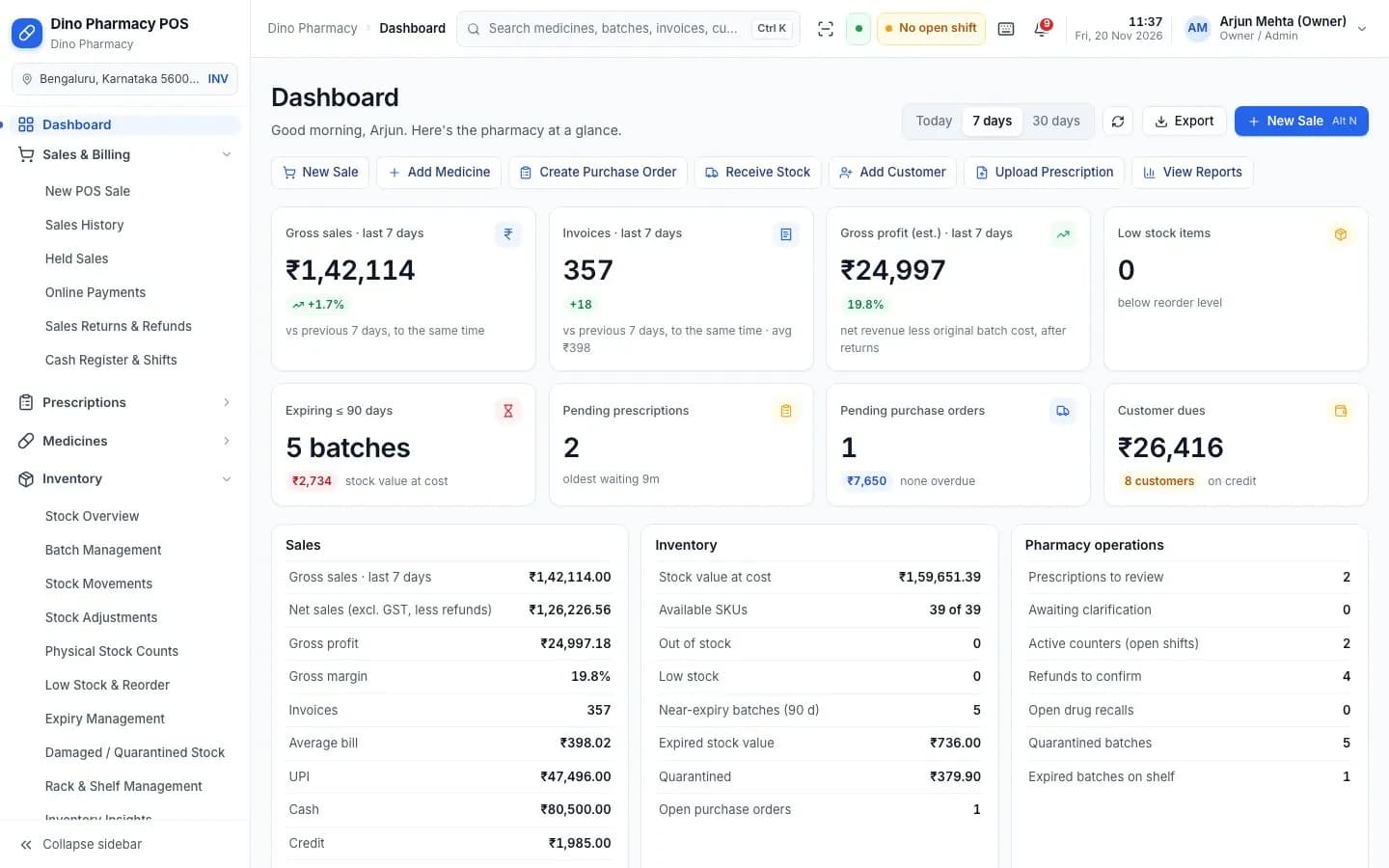
- Owner dashboard: sales, invoices, gross profit, dues, expiring stock and open orders against the previous period
- Roles and permissions with six built-in roles and separation of duties
- Audit log of sign-ins, postings, approvals and setting changes with before and after values
- Setup wizard: pharmacy identity, GSTIN, drug licences, tax rules, pharmacist, staff, opening stock and printer
- Approval limits for discounts, credit, stock adjustments, purchase orders and expenses
- Alerts for expiring stock, prescriptions awaiting review, unsettled payments and cold-chain excursions
- The applications above, and any system you integrate later05
Backend REST API
- REST endpoints used by the web and admin applications
- Authentication and session handling
- Role and permission checks
- Endpoints for the integrations configured during setup
- Your server or managed database instance06
Database
- Database schema for every module listed above
- Migration files used during setup
- Reference data required for first run
Branding and setup plan for Dino Pharmacy POS
A standard branded deployment is estimated at approximately 2 weeks after the scope, brand assets, hosting access and required service credentials are confirmed. The estimate covers agreed branding, environment setup, supported integration configuration, supplied-data migration, testing and handover. Actual timing depends on product scope, data readiness, client approvals and third-party dependencies. Custom modules and new integrations are quoted separately; the written project schedule governs delivery.
- Day 1–2
1. Requirements and brand assets
Scope confirmation, logo, colour palette, domain, company details and the integration credentials you want configured.
- Day 3–6
2. White-label branding applied
Brand identity, theme colours, typography, app icons, email and notification templates applied across every included interface.
- Day 7–10
3. Deployment and integrations
Server or cloud deployment, domain and SSL, database setup, payment gateway, SMS, email and maps configuration.
- Day 11–14
4. Migration, testing and handover
Migration of supplied data, walkthrough testing, source-code handover, documentation and admin training. Three months of technical support starts here.
Who can use Dino Pharmacy POS?
- Independent pharmacies and medical stores billing GST invoices every day
- Multi-counter pharmacies that need shared stock and per-counter cash control
- Hospital and clinic pharmacies handling Schedule H and H1 medicines
- Small pharmacy chains wanting one product under their own name
- Software resellers licensing a pharmacy product, subject to the written licence
Problems Dino Pharmacy POS solves
Older batches left on the shelf while newer stock is sold first
Expired, recalled or temperature-damaged stock billed by mistake
Scheduled medicines sold without a recorded prescription or pharmacist check
Discounts and credit given at the counter with no approval trail
Supplier bills paid without matching what actually arrived
UPI and card fees disappearing between the till and the bank
GST returns prepared by hand from scattered sales and purchase records
Application Features
Every module below ships pre-built and is configurable during white-label setup.
POS & Billing
Keyboard-first search across brand, generic, salt and barcode with stock, MRP and next expiry in the result; quantity shortcut such as 2*calpol; FEFO batch, rack and GST on each line; pack and loose-unit selling; held bills resumed at another counter; customer lookup by phone; keyboard shortcuts; offline drafts.
Supervisor Approvals & Split Tenders
Discounts above a cashier's limit or sales over a customer's credit limit pause the bill until a supervisor signs in for that bill only, with an authenticator code when MFA is on and both names in the audit log. Cash, UPI, card, credit and online payment links can be split on one bill, with change due and retry-safe posting.
GST Tax Invoices
Numbered tax invoices with the pharmacy's legal name, GSTIN and drug licence numbers, plus HSN, batch, expiry, MRP and the CGST and SGST split on every line. Seller and buyer details are stored on the invoice when it posts. Print on A4, 80 mm or 58 mm paper or share digitally, and reprint from sales history.
Returns, Shifts & Cash Drawer
Returns against the original invoice, refunded by the original tender and capped at what was paid, with credit notes numbered per financial year. Returned packs wait in quarantine for a second person's quality check. Each counter opens a shift with a float and closes with a blind count of expected against counted.
Inventory & Expiry
Photo catalogue with brand, generic, salt, schedule, HSN, pack and MRP; categories with images; stock overview with value at cost, rack location, reorder point and next expiry; batches and lots with adjust, hold and write-off; physical counts; expiry horizons of 30, 60 and 90 days with value at risk; ABC and slow-mover insights.
Quarantine, Recalls & Cold Chain
Damaged, recalled, expired and returned stock is held away from the counter until someone other than the person who took the return releases it. Drug recalls trace sold lines. An out-of-range fridge reading holds every batch in that unit until a pharmacist signs it off.
Prescriptions & Schedule H/H1/X Workflows
Schedule H, H1 and X flags come from the catalogue. The bill cannot be charged until a prescription verified by a registered pharmacist is linked, or the pharmacist records the paper slip with patient, doctor, registration number, reference and date; the same slip cannot be reused. Uploaded prescriptions wait in a pharmacist review queue.
Regulated Registers & Compliance Reports
Prescription reviews, restricted dispensing lines, recalls and cold-chain readings for any period, with the pharmacy's licence and pharmacist details, exported as CSV, Excel or PDF. Supply registers are built from posted invoice records. Regulatory sign-off stays with the pharmacy.
Purchasing & Suppliers
Purchasing overview of spend, open orders, discrepancies and return claims; purchase orders from reorder suggestions with approval above a value; goods receipts with batch, expiry, MRP, cost and free units; duplicate supplier invoice protection; three-way match; purchase returns, debit and credit notes; supplier ledger with ageing, payments and price history.
Finance & GST
Financial overview, P&L comparing periods at actual batch cost with shrinkage, cash book, receivables and payables ageing, refund ledger, expenses with approval, and bank settlement of UPI, card and dues receipts with the UTR and charges booked. GSTR-1 and GSTR-3B working papers by table, HSN and rate export as CSV or JSON for the tax advisor.
Reports & Analytics
Sales, inventory, purchase, customer, profitability and compliance reports filtered by date and grouped by day, hour, counter, cashier, medicine, category or tender, with CSV, Excel and PDF export. A custom report builder saves versioned reports shared by role. On a year of synthetic demo data (about 18,000 invoices) the sales report returned in 0.2 to 0.3 seconds.
Customers & Credit
Phone-first customer directory with purchase history, dues, credit limit and status; credit limits checked at checkout; dues collected by cash, UPI or card; duplicate review and merge; refill requests and consented SMS or WhatsApp reminders from templates.
Security & Administration
Six built-in roles (owner, pharmacist, cashier, inventory, purchase, accountant) with adjustable permissions checked in the API, separation of duties, two-factor sign-in, login rate limiting, device enrolment, session revocation, an audit log with before and after values, a setup wizard and role-based alerts.
Mobile & Multi-Counter
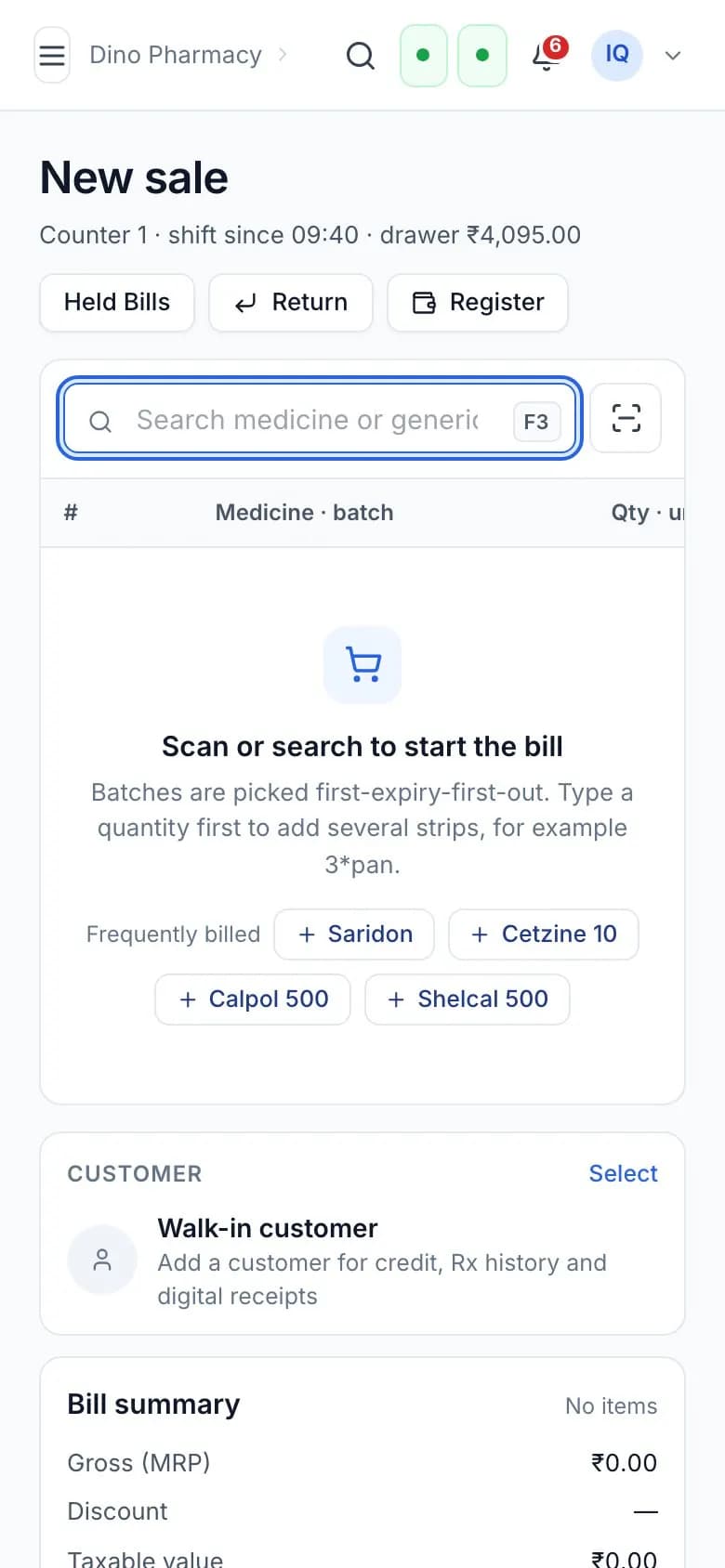
Responsive web app for desktops, tablets and phones, with a tablet layout that folds the sidebar so the bill gets the space. Several counters bill at once on one stock ledger, each with its own shift and drawer. A Flutter Android app runs the same role workflows through the same API, with barcode scanning, thermal printers and offline drafts and counts.
Admin panel capabilities
- Owner dashboard: sales, invoices, gross profit, dues, expiring stock and open orders against the previous period
- Roles and permissions with six built-in roles and separation of duties
- Audit log of sign-ins, postings, approvals and setting changes with before and after values
- Setup wizard: pharmacy identity, GSTIN, drug licences, tax rules, pharmacist, staff, opening stock and printer
- Approval limits for discounts, credit, stock adjustments, purchase orders and expenses
- Alerts for expiring stock, prescriptions awaiting review, unsettled payments and cold-chain excursions
- Two-factor sign-in, device enrolment and session revocation
- Encrypted off-site backups with a restore drill
Counter and store-room capabilities
- Search by brand, generic, salt or barcode and bill on FEFO batches
- Split payment across cash, UPI, card and credit
- Print GST invoices on A4, 80 mm or 58 mm paper
- Link or record pharmacist-verified prescriptions for scheduled medicines
- Receive stock with batch, expiry and MRP
- Hold, quarantine and release stock with a second person's check
- Look up customers by phone and collect dues
- Run on a tablet, a phone or the Flutter Android app
Dino Pharmacy POS screenshots
Click any image for a full-resolution preview.
Owner Dashboard — Sales, profit, dues and expiring stock
adminOwner Dashboard — Sales, profit, dues and expiring stock
POS Search — Brand, generic, salt or barcode
adminPOS Search — Brand, generic, salt or barcode
POS Cart — FEFO batch, rack and GST on every line
adminPOS Cart — FEFO batch, rack and GST on every line
Supervisor Approval — Exceptions signed for one bill
adminSupervisor Approval — Exceptions signed for one bill
Payment — Cash, UPI, card or credit, split any way
adminPayment — Cash, UPI, card or credit, split any way
GST Invoice — A4, 80 mm or 58 mm
adminGST Invoice — A4, 80 mm or 58 mm
Invoice Detail — Your pharmacy's identity on every bill
adminInvoice Detail — Your pharmacy's identity on every bill
Sales History — Reprint, return or export
adminSales History — Reprint, return or export
Returns — Credit notes and quality check before restock
adminReturns — Credit notes and quality check before restock
Shifts — Blind close per counter
adminShifts — Blind close per counter
Prescription Check — Scheduled lines wait for a verified Rx
adminPrescription Check — Scheduled lines wait for a verified Rx
Paper Prescription — Recorded by the pharmacist in the bill
adminPaper Prescription — Recorded by the pharmacist in the bill
Prescription Queue — Pharmacist review
adminPrescription Queue — Pharmacist review
Compliance Report — Registers for any period
adminCompliance Report — Registers for any period
Catalogue — Photos, schedule, HSN and stock
adminCatalogue — Photos, schedule, HSN and stock
Categories — Therapeutic groups with images
adminCategories — Therapeutic groups with images
Stock Overview — Sellable, held and value at cost
adminStock Overview — Sellable, held and value at cost
Batches — Lot, expiry, cost and MRP
adminBatches — Lot, expiry, cost and MRP
Quarantine — Held stock released by a second person
adminQuarantine — Held stock released by a second person
Expiry — Horizons with value at risk
adminExpiry — Horizons with value at risk
Inventory Insights — ABC, slow movers, days of cover
adminInventory Insights — ABC, slow movers, days of cover
Purchasing Overview — Spend, orders and discrepancies
adminPurchasing Overview — Spend, orders and discrepancies
Purchase Orders — Draft to fully received
adminPurchase Orders — Draft to fully received
Goods Receipts — Batch and expiry on arrival
adminGoods Receipts — Batch and expiry on arrival
Supplier Ledger — Bills, notes and payments
adminSupplier Ledger — Bills, notes and payments
Finance Overview — Profit, money in and money out
adminFinance Overview — Profit, money in and money out
Profit & Loss — Period comparison at batch cost
adminProfit & Loss — Period comparison at batch cost
Bank Settlement — Match receipts to the bank credit
adminBank Settlement — Match receipts to the bank credit
Settlement History — Expected against credited
adminSettlement History — Expected against credited
GST Summary — GSTR-1 and GSTR-3B working papers
adminGST Summary — GSTR-1 and GSTR-3B working papers
Expenses — Recorded, approved and posted
adminExpenses — Recorded, approved and posted
Sales Report — Group by counter, cashier or hour
adminSales Report — Group by counter, cashier or hour
Profitability — Margin by medicine and category
adminProfitability — Margin by medicine and category
Custom Reports — Saved and shared by role
adminCustom Reports — Saved and shared by role
Customers — Phone-first lookup and history
mobileCustomers — Phone-first lookup and history
Credit & Dues — Limits and collections
adminCredit & Dues — Limits and collections
Roles & Permissions — Six built-in roles
adminRoles & Permissions — Six built-in roles
Audit Log — Who, when, what and why
adminAudit Log — Who, when, what and why
Setup Wizard — Go-live checklist
adminSetup Wizard — Go-live checklist
Alerts — Routed to the right role
adminAlerts — Routed to the right role
Tablet POS — Full-width bill on a tablet
adminTablet POS — Full-width bill on a tablet
Tablet Dashboard — Owner view in portrait
adminTablet Dashboard — Owner view in portrait
Phone — Owner dashboard
mobilePhone — Owner dashboard
Phone — Counter sale
mobilePhone — Counter sale
Phone — Stock overview
mobilePhone — Stock overview
How the Application Works
End-to-end workflow across Owner, Pharmacist, Cashier, Inventory Manager, Purchase Manager, Accountant.
Scan or search a medicine
Step 1The earliest-expiring sellable batch is added
Step 2Scheduled lines wait for a pharmacist-verified prescription
Step 3Take payment by cash, UPI, card or credit
Step 4Print the GST invoice on A4 or thermal paper
Step 5Stock, ledgers and registers post from the invoice
Step 6Close the shift against a blind count
Step 7Dino Pharmacy POS roles, modules and integrations
User roles
Owner, Pharmacist, Cashier, Inventory Manager, Purchase Manager, Accountant
Modules
POS & Billing: FEFO Batches, Supervisor Approvals & Split Tenders, GST Tax Invoices in A4, 80 mm and 58 mm, Sales History, Returns with Quality Check & Credit Notes, Shifts & Cash Drawer with Blind Close, Medicine Catalogue, Categories & Stock Overview, Batches, Quarantine, Expiry & Cold-Chain Holds, Drug Recalls, Physical Counts & Inventory Insights, Schedule H/H1/X Prescription Workflows & Pharmacist Sign-Off, Prescription Queue, Paper Prescriptions & Regulated Registers, Purchase Orders, Goods Receipts & Three-Way Match, Purchase Returns, Debit Notes & Supplier Ledger, Finance Overview, P&L, Cash Book & Expenses, Bank Settlements with Charges, Receivables & Payables, GSTR-1 and GSTR-3B Working Papers, Sales, Inventory, Purchase, Customer & Profitability Reports, Custom Report Builder, Customers, Credit Limits, Dues & Refill Reminders, Roles & Permissions, Two-Factor Sign-In & Audit Log, Setup Wizard, Alerts & Notifications, Multi-Counter, Tablet Layout & Flutter Android App
Integrations
Payment links through the buyer's own gateway account, SMS and WhatsApp message templates through the buyer's provider, Barcode scanners (keyboard wedge), thermal printers and cash drawers, Encrypted off-site backups to storage the buyer chooses, Other gateways, e-invoicing or ERP links as a custom integration
Reports
Sales analytics by day, hour, counter, cashier, medicine, category or tender, Profitability by medicine and category at actual batch cost, Inventory analytics: stock value, ABC class, slow movers and days of cover, Expiry horizons with value at risk, Purchase and supplier analytics, Customer analytics, credit and dues ageing, Compliance reports: prescriptions, restricted dispensing, recalls and cold-chain readings, P&L, cash book, bank settlements and GSTR-1/3B summaries, Custom saved reports shared by role, exported to CSV, Excel or PDF
Integration scope
- Cash, UPI, Card & Customer Credit · built in
- Thermal Printers (80 mm / 58 mm) & Cash Drawer · configuration
- Barcode Scanners · built in
- Online Payment Links (your gateway) · configuration
- SMS / WhatsApp Templates (your provider) · configuration
- Encrypted Off-Site Backups (S3, B2 or Google Drive) · configuration
- E-Invoicing, ERP & Other Gateways · custom
Cashier
- Search or scan medicines and bill on FEFO batches
- Take cash, UPI, card or credit and print the GST invoice
- Open and close a shift with a blind count
Pharmacist
- Verify uploaded prescriptions in the review queue
- Record paper prescriptions for Schedule H/H1/X lines
- Sign off cold-chain excursions and quarantined stock
Inventory Manager
- Receive lots with batch, expiry, MRP and cost
- Adjust, hold or write off batches with a reason
- Run physical counts and act on expiry horizons
Purchase Manager
- Raise purchase orders from reorder suggestions
- Resolve discrepancies with debit notes
- Start purchase returns to suppliers
Accountant
- Match UPI, card and dues receipts to bank settlements
- Approve expenses and review the cash book
- Export GSTR-1 and GSTR-3B working papers
Owner
- Read the dashboard, P&L and reports
- Approve exceptions above staff limits
- Manage roles, permissions and the audit log
What You Receive
- Source code for the Next.js web app
- Source code for the Express and Prisma API with MySQL schema and migrations
- Source code for the Flutter Android app
- Docker Compose deployment files with HTTPS and backup scripts
- Product spec, business rules, API contracts and test suites as listed in scope
- Three months of technical support
- Complete source code for the applications and modules in the agreed purchase scope
- Frontend application source code
- Backend API source code
- Admin dashboard source code
- Database schema and migration files
- Mobile application source code (Android)
- Application setup documentation
- Environment configuration guidance
- White-label branding support
- Basic deployment assistance
- Server and database migration assistance
- 3 months of technical support
After purchase, you receive the complete source code for the agreed project scope. Branding, basic setup, deployment and migration assistance are included as agreed. A standard branded setup is estimated at approximately 2 weeks after required assets and access are confirmed, subject to the written schedule and third-party dependencies. Three months of technical support starts on the confirmed delivery date.
Deployment and Migration Support
TechDino provides basic migration and deployment assistance to help move the application to the customer's server, VPS, cloud hosting or supported hosting environment. This includes environment setup guidance, database migration, application build guidance and basic deployment verification.
What migration support does not cover
- Hosting fees are not included
- Domain charges are not included
- Paid third-party APIs are not included
- SMS, email, maps and payment-gateway charges are not included
- Major server architecture changes are quoted separately
- New features and large customizations are not included in migration support
Three Months Technical Support Included
Every TechDino project includes three months of technical support from the confirmed delivery date. This support covers installation guidance, deployment-related assistance, configuration help, clarification of the existing codebase and correction of verified issues within the delivered project scope.
Support includes
- Installation guidance
- Environment configuration help
- Deployment clarification
- Database migration clarification
- Existing-feature usage guidance
- Verified bug fixes within the delivered scope
- Basic codebase clarification
- Build and release guidance
Support does not include
- New modules
- New business workflows
- Major UI redesigns
- Third-party service fees
- New third-party integrations
- Infrastructure or hosting costs
- Continuous server administration
- Changes outside the original agreed scope
Additional development, custom features and support after the included three-month period can be provided under a separate support or development agreement.
Source Code and Customization
The customer receives the complete source code included in the agreed product scope. The application can be deployed under the customer's brand, domain and hosting environment. The customer can maintain, extend and customize the delivered application according to the applicable purchase or licence agreement.
Scope for Dino Pharmacy POS: Applicable source code for the Next.js web app, the Express and Prisma API, the MySQL schema and migrations, the Flutter Android app, Docker Compose deployment files and project documentation, for the agreed purchase scope. Licence type: Commercial software license; use, modification and resale rights agreed in writing, separate from copyright transfer..
Usage, copyright and resale termsDino Pharmacy POS by market
Dino Pharmacy POS is client-hosted, so each deployment can be scoped around the buyer's currency, timezone, payment providers, data-hosting preference and local integration requirements. These market notes describe planning considerations, not a local office or completed client claim.
- India & HyderabadBuilt for Indian pharmacies first: rupee amounts held in paise, the IST business day, GST with HSN and the CGST/SGST split, GSTR-1 and GSTR-3B working papers, Schedule H, H1 and X flags, pharmacist registration numbers and drug licence details on invoices. The demo runs a seeded Hyderabad pharmacy.Review market requirements
- Outside IndiaThe tax, schedule and register logic is written for Indian rules. Pharmacies in the UAE, the Gulf or elsewhere need VAT, controlled-medicine categories and local register formats reviewed and adapted as a scoped project before use.Review market requirements
Technology and Architecture
Technology stack
- Next.js and TypeScript web app
- Express and Prisma API on MySQL 8
- Flutter Android app on the same API
- Docker Compose deployment with HTTPS, two-factor sign-in and encrypted backups
- Hosting, domain and third-party services charged separately
Deployment options
- Client-Controlled VPS
- Hostinger / DigitalOcean / Linode / Hetzner
- AWS / Google Cloud / Microsoft Azure
- On-Premises Server
- Docker Compose
Data migration covered
- Opening stock and catalogue import from the spreadsheet you supply, as agreed in scope
- Opening balances for customers and suppliers
- Review of existing pharmacy data for an agreed migration
Dino Pharmacy POS is fully customizable to your brand
Nothing ships carrying the TechDino name. Every surface a customer or staff member sees is rebranded to your business before handover, and because the source code is yours, your own team can change anything afterwards.
- Business name, logo and app icons
- Brand colour palette and typography
- Your own domain and SSL certificate
- Login, email and notification templates
- Invoice, receipt and report branding
- App-store listing assets under your developer account
- Content, labels and terminology for your market
- Currency, timezone, tax and language settings
White-label options specific to Dino Pharmacy POS
- Product name, logo and colour palette
- Sign-in page, domain and email sender
- Invoice header with the pharmacy's name, address, GSTIN and licence numbers
- Android app name and icon
- Product name, logo, colours, sign-in page and domain
- Invoice header, pharmacy identity, GSTIN and licence numbers from settings
- Role permissions, approval limits and discount limits
- Additional reports, languages and printer formats
- Custom workflows and integrations
Transform Dino Pharmacy POS into Your Brand
Toggle between our base demo branding and a customized client launch build.
Theme Colors
Custom Corporate Palette
Domain & SSL
Client Custom Domain
App Stores
Published Under Your Account
What business owners get
- Your own pharmacy software brand on screens, invoices and sign-in
- Old stock leaves the shelf first, cutting expiry write-offs
- Every discount, credit and return exception carries a name and a reason
- Supplier bills matched to orders and receipts before payment
- Bank and card charges visible in the P&L
- Counters can be added as the pharmacy grows, on one stock ledger
How TechDino Compares to Alternative Software Delivery Models
Evaluating ready-made software against custom development from scratch or recurring monthly SaaS subscriptions.
Ready-Made Dino Pharmacy POS
- Timeline: 2-Week Setup Estimate; final schedule confirmed after scope review
- Pricing: One-time quotation per agreed scope
- Code Access: Full source-code handover included
- Hosting: Self-hosted on client VPS (Hostinger, AWS, DigitalOcean)
- Software Fees: 0 recurring platform fees
Development From Scratch
- Timeline: Onboarding varies by vendor and scope
- Pricing: Agency quotes vary with scope; compare the written quotation you receive
- Code Access: Handed over upon project sign-off
- Hosting: Cloud infrastructure setup
- Risks: Scope changes, milestone delays, untested edge cases
Rental Subscriptions
- Timeline: Onboarding varies by vendor and scope
- Pricing: Compare actual subscription and usage charges
- Code Access: Check the vendor’s source and export terms
- Hosting: Check available hosting and residency options
- Customization: Compare supported extensions and APIs
Global Deployment, Currency & Invoicing Support
Delivery is coordinated remotely from Hyderabad. Currency, language, hosting and payment requirements are reviewed against this product’s included scope.
Scope INR billing, tax fields, gateway credentials and India hosting requirements for this product. Only the integrations listed in the agreed scope are included.
India Market DetailsReview USD/CAD billing, payment-provider eligibility and your preferred hosting country. Gateway and infrastructure choices depend on the product and agreed scope.
USA Market DetailsConfirm AED/SAR billing, language requirements, supported gateways and the exact hosting country. Arabic interfaces and new integrations are separately scoped where not included.
UAE Market DetailsReview GBP/EUR billing, payment providers, export needs and the required hosting country. Hosting alone does not establish regulatory compliance.
UK Market DetailsConfirm AUD/SGD billing, gateway availability and your required hosting country. Payment and deployment options are reviewed for the actual application.
Australia Market DetailsExplore target markets and discuss payment, tax, timezone and hosting requirements for your deployment.
Dino Pharmacy POS frequently asked questions
What is Dino Pharmacy POS?
Dino Pharmacy POS is white-label pharmacy software from TechDino for Indian retail pharmacies. Nine connected modules cover counter billing, inventory and expiry, prescriptions, purchasing, finance and GST, reports, customers and credit, security and administration, and mobile and multi-counter use, on one stock ledger and one set of books.
How does billing pick the right batch?
Each cart line is filled from the earliest-expiring sellable batch (FEFO), with its expiry, rack location and GST shown. Expired, recalled, quarantined and temperature-held batches are not offered, and stock moves in the same database transaction as the sale, so two counters cannot sell the last strip twice.
Does Dino Pharmacy POS handle Schedule H, H1 and X medicines?
Schedule H/H1/X workflows are supported. Flags come from the catalogue, and a bill with a scheduled line cannot be charged until a prescription verified by a registered pharmacist is linked or recorded from the paper slip. Registers and compliance reports are built from posted invoices. Licences, pharmacist registration and regulatory sign-off stay with the pharmacy.
Which invoice formats and payment methods are included?
GST tax invoices with HSN, batch, expiry, MRP and the CGST and SGST split print on A4, 80 mm or 58 mm paper. Payments can be cash, UPI, card, customer credit or an online payment link, split across several tenders on one bill.
Can several counters bill at the same time?
Yes. Each counter has its own shift and cash drawer, and stock and credit checks lock the affected rows, so several counters bill on one stock ledger without overselling or pushing a customer past their credit limit.
Is there a mobile app?
Yes. A Flutter app for Android runs the same role workflows through the same API, and the web app adapts to tablets and phones. An iOS build is not listed as included and is quoted separately if needed.
What GST and finance reports are available?
Financial overview, P&L at actual batch cost, cash book, receivables and payables ageing, bank settlements with charges, expenses, and GSTR-1 and GSTR-3B working papers by table, HSN and rate, exported as CSV or JSON for your tax advisor.
Is the source code included, and can I resell it under my brand?
Source code for the agreed scope is delivered: the Next.js web app, the Express and Prisma API, the MySQL schema and migrations, the Flutter Android app, Docker deployment files and documentation. Rebranding is supported; resale and redistribution need written permission under the licence agreed with TechDino.
How long does setup take?
A standard branded deployment is estimated at approximately two weeks after the scope, brand assets, hosting access, pharmacy licence and GST details are confirmed. Opening stock import and custom work depend on the data supplied.
What does Dino Pharmacy POS not include?
Hosting, domain, payment gateway, SMS or WhatsApp provider accounts, printers and scanners, drug licences, pharmacist registration, GST filing and legal or regulatory advice are arranged by the buyer. Custom features and support after the three-month period are quoted separately.
Is migration support included?
Yes. Basic setup, deployment and database migration assistance is included for moving the application to a supported hosting environment.
How much technical support is included?
Three months of technical support is included from the confirmed project delivery date.
Are hosting and third-party charges included?
No. Hosting, domain registration, SMS, email, maps, payment gateways and other paid third-party services are separate.
Can I request new features?
Yes. New features and major customizations can be developed under a separate quotation based on the required scope.
Is pricing published?
No. Every purchase is quoted on scope: product, branding, deployment target, integrations and customisation. Share your requirement on WhatsApp or the contact form and TechDino returns a written quotation after a walkthrough.
Related products and resources
Clinic CRM
White-Label Clinic Management Software
View productDino Inventory
Dino Inventory — AI-Native Inventory Management Software
View productRetailDino SaaS
White-Label Retail POS & Inventory SaaS Platform with Complete Source Code
View productDino ERP
AI-Powered ERP Software with Source Code
View productDeploy Dino Pharmacy POS under your brand
Source code for the agreed scope, migration assistance and three months of technical support, delivered by TechDino.
Or Chat Directly on WhatsAppRequest a Dino Pharmacy POS Walkthrough
Describe what you want to launch. Prepare a WhatsApp message for Nayesh. Response time depends on availability.