
White-Label Home Services Marketplace Software — Dino Services
White-Label Home Services App with Customer, Partner and Admin Apps
Dino Services is a white-label, multi-city home services marketplace with a customer website, a Flutter customer app, a Flutter partner app and an admin and City Ops console on one backend, with slot booking, live dispatch, start codes, photo proof, extra-work quotes, GST invoices and maker-checker payouts, sold with the source code.
Built for: Home Services Marketplaces, Urban & Hyperlocal Service Startups, AC, Appliance & Electrical Service Networks, Cleaning & Pest Control Companies
- Complete Source Code
- Fully Brand-Customizable
- 2-Week Setup Estimate
- Migration Assistance
- 3 Months Support
- Mobile App Included
Complete source code
Frontend, backend, admin dashboard and database schema for the agreed scope — handed to you, not rented.
Fully customizable to your brand
Business name, logo and app icons, Brand colour palette and typography, Your own domain and SSL certificate, Login, email and notification templates and more — applied before handover.
2-Week Setup Estimate
A standard branded deployment is estimated at approximately 2 weeks after the scope, brand assets, hosting access and required service credentials are confirmed. The estimate covers agreed branding, environment setup, supported integration configuration, supplied-data migration, testing and handover. Actual timing depends on product scope, data readiness, client approvals and third-party dependencies. Custom modules and new integrations are quoted separately; the written project schedule governs delivery.
Dino Services is a white-label home services marketplace from TechDino with a customer website, customer and partner apps for Android and iOS, and an admin and City Ops console on one backend, covering booking, dispatch, start codes, photo proof, extra-work quotes, GST invoices and payouts. Complete source code, migration assistance and three months of technical support are included; setup is approximately two weeks.
What is Dino Services?
- Launch window
- 14 days for a standard branded deployment
- Tenancy model
- Single business (one organisation per deployment)
- Source code
- Included — Commercial License / Software Grant
- Deployment
- Client-Controlled VPS, Hostinger / DigitalOcean / Linode / Hetzner, AWS / Google Cloud / Microsoft Azure, On-Premises Server, Docker Compose
Dino Services is a ready-made, white-label home services marketplace from TechDino for founders, city operators and service companies who want their own booking business for AC servicing, cleaning, electrical, plumbing, appliance repair, carpentry, pest control, painting and salon-at-home, instead of paying commission on every job to an aggregator. One purchase covers five connected parts on a single Node.js, Express and MySQL backend with a background worker. The customer website, built in Next.js, has a city picker, category and service pages with fixed prices, a cart with a live bill estimate, saved addresses checked against serviceable pincodes, a day and time picker that holds the slot for ten minutes, and payment by UPI, card or after the service. The customer app for Android and iOS, built in Flutter, runs in English, Telugu, Hindi, Tamil, Malayalam and Kannada, with consent controls, live tracking on a map, masked calling and chat, a four-digit start code shared only at the door, itemised extra-work quotes to approve or reject, before-and-after photo review, a GST tax invoice as PDF and a 30-day warranty claim. The partner app for professionals has an online switch, timed job offers showing service, area and earnings, a five-step job flow of travel, arrive, start, work and complete, a safety checklist and required photos, extra work quoted only from the approved price list, the customer's signature at completion, earnings, payouts, documents, SOS and offline drafts. The admin console gives head office and city teams role-based access for super admin, city manager, dispatch, finance and support: live dispatch on a map with ranked professionals, manual offers or auto-assignment, a schedule board, quality and incident queues, the catalogue with add-ons, price books per city and policies, cities and service zones by pincode with daily capacity and zone boundaries, partner KYC review, payments, GST invoices, refunds, settlements whose payout batches need a second approver, a ledger trial balance, coupons, banners, reviews, support tickets, disputes, warranty requests, CSV reports and an audit log of every staff decision. The API, worker, database, website, console and both apps are handed over with Docker setup, and TechDino charges no per-booking platform fee. Demo service providers, customers and bookings are illustrative application content, not TechDino customer claims.
Founders, city operators and service companies in India, the Gulf and other growing markets who want their own home services booking business with a partner app, dispatch and payouts, without a per-job aggregator commission.
How can you buy Dino Services?
Dino Services with source code
Dino Services is delivered with the complete source code included in the agreed product scope — frontend, backend, admin dashboard, database schema and any applicable mobile application code. Source-code access, licensing rights and ownership terms are set out in the applicable purchase or licence agreement, so the delivered application can be maintained and extended by your own team.
Source-code access, copyright and licensing rightsSelf-hosted Dino Services
Dino Services runs on hosting you control — your own VPS, cloud account or existing infrastructure — rather than on a vendor platform. Deployment, database setup and migration assistance are included, and there is no mandatory monthly platform fee attached to the software itself. Third-party services such as payment gateways, SMS providers and hosting are billed by those providers directly.
Self-hosted deployment optionsWhite-label Dino Services
Dino Services can use your name, logo, colour scheme, domain and applicable templates; app-store assets apply where a mobile application is in scope. A standard branded deployment is estimated in approximately 2 weeks after scope and required assets are confirmed, subject to client approvals, data readiness, third-party dependencies and the written schedule.
What white-label customization coversDino Services for agencies and resellers
Agencies, studios and IT partners can take Dino Services to their own clients under their own brand. Licensing terms for reselling, the number of deployments permitted and any ongoing support arrangement are defined in the applicable agreement before the engagement starts.
Reseller and partner arrangementsApplications Included
Dino Services is delivered as the 7 applications below. Each one is part of the purchase scope.
- Customer, Service Professional (Partner), City Manager — in any browser01
Customer Web Application
- Browse services with fixed prices by city
- Book a slot held for ten minutes and pay by UPI, card or after the service
- Track the professional live with masked calling and chat
- Share a start code at the door
- Approve or reject extra-work quotes
- Customer website and app on Android and iOS02
Mobile Application
- Browse services with fixed prices by city
- Book a slot held for ten minutes and pay by UPI, card or after the service
- Track the professional live with masked calling and chat
- Share a start code at the door
- Native build for Android and iOS
- The business owner and back-office team03
Admin Dashboard
- Role-based sign-in with work email, one-time code and optional authenticator app
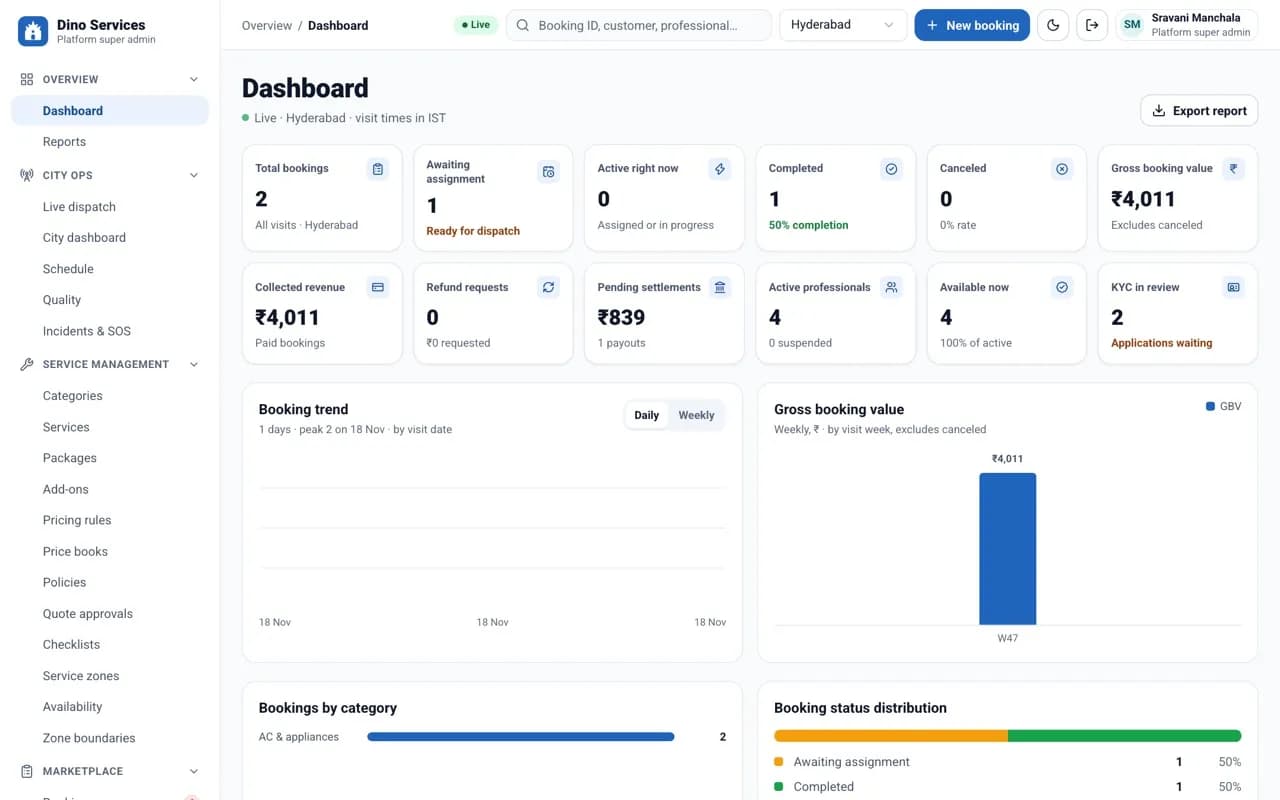
- Dashboard and per-city dashboard: bookings, revenue, refunds, settlements, KYC queue
- Live dispatch map with ranked professionals and auto-assignment
- Schedule board, quality queue, incidents and SOS
- Manual bookings for phone orders; reassign, cancel or refund any booking
- Catalogue, add-ons, city price books and policies
- Staff members handling day-to-day operations04
Staff Portal
- Booking appears in live dispatch; the system ranks professionals and staff send an offer or auto-assign
- Delivery partners and field agents05
Delivery / Service Agent Application
- Role-specific access and workflows are confirmed in the agreed product scope
- The applications above, and any system you integrate later06
Backend REST API
- REST endpoints used by the web and admin applications
- Authentication and session handling
- Role and permission checks
- Endpoints for the integrations configured during setup
- Your server or managed database instance07
Database
- Database schema for every module listed above
- Migration files used during setup
- Reference data required for first run
Branding and setup plan for Dino Services
A standard branded deployment is estimated at approximately 2 weeks after the scope, brand assets, hosting access and required service credentials are confirmed. The estimate covers agreed branding, environment setup, supported integration configuration, supplied-data migration, testing and handover. Actual timing depends on product scope, data readiness, client approvals and third-party dependencies. Custom modules and new integrations are quoted separately; the written project schedule governs delivery.
- Day 1–2
1. Requirements and brand assets
Scope confirmation, logo, colour palette, domain, company details and the integration credentials you want configured.
- Day 3–6
2. White-label branding applied
Brand identity, theme colours, typography, app icons, email and notification templates applied across every included interface.
- Day 7–10
3. Deployment and integrations
Server or cloud deployment, domain and SSL, database setup, payment gateway, SMS, email and maps configuration.
- Day 11–14
4. Migration, testing and handover
Migration of supplied data, walkthrough testing, source-code handover, documentation and admin training. Three months of technical support starts here.
Who can use Dino Services?
- Home services marketplace founders launching in one city and expanding
- AC, appliance, electrical and plumbing service companies with their own technicians
- Cleaning, pest control and painting businesses taking online bookings
- Facility and property maintenance operators managing many visits a day
- Investors and agencies acquiring a ready product to brand and launch
Problems Dino Services solves
Bookings taken by phone and WhatsApp with no reliable slot or capacity view
Technicians arriving at the wrong time, or claiming jobs that never happened
Disputes over extra charges added at the door without the customer's approval
No photo proof, invoice or warranty record when a customer complains
Partner payouts calculated by hand with no second check
Aggregator commissions taking a share of every job
Application Features
Every module below ships pre-built and is configurable during white-label setup.
Customer Website
City home page with search, categories and popular services; a city picker that changes prices and zones; category and service pages with what is included, FAQs and a fixed price; sign-in with mobile number and one-time code; sitemap, page titles and share images for search engines.
Cart, Checkout & Slot Holds
Cart with quantities and a live bill estimate of item, fee and GST, saved addresses checked against serviceable pincodes, coupon codes, a day and time picker that holds the slot for ten minutes, notes for the professional, and payment by UPI, card or after the service.
Customer App (Android & iOS)
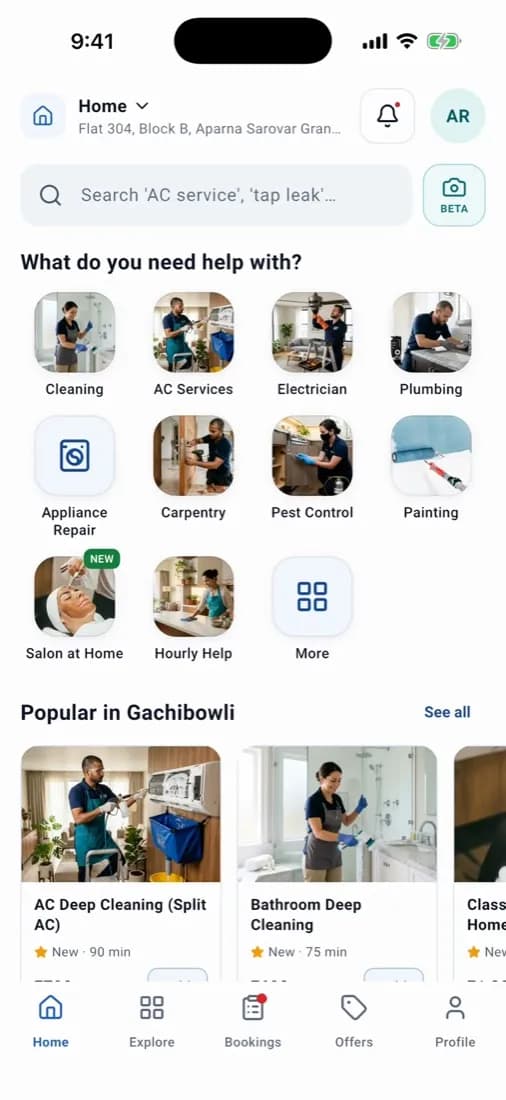
Flutter app in English, Telugu, Hindi, Tamil, Malayalam and Kannada with a clear consent screen, home with address and search, an explore tab for the full catalogue, bookings with status and amount, an offers tab and profile with addresses, language, privacy and support.
Live Tracking & Start Code
A live timeline of assigned, on the way, arrived, started and done; map tracking with masked calling and chat; and a four-digit start code the customer shares only when the professional is at the door. Without it the job cannot start.
Extra-Work Quotes & Photo Proof
Extra work arrives as an itemised quote from the approved price list, with photo evidence, for the customer to approve or reject. Before and after photos, a work checklist and the customer's signature are recorded with the job.
Invoices, Warranty & Support
GST tax invoice with the tax split, downloadable as PDF; refunds and wallet balance; a 30-day service warranty with a one-tap claim; recurring plans to pause, resume or cancel; help tickets and data export.
Partner App for Professionals
Online and offline switch, job offers with service, time, area and earnings on a timer, the address shown only after accepting, a jobs list and calendar with working hours and time off, and a five-step job flow: travel, arrive, start, work and complete.
Partner Earnings, Safety & Offline
Safety checklist and required before photo, job timer, cash-to-collect or paid-online status, earnings and payouts, documents, an SOS button and offline drafts that sync when the connection returns.
Live Dispatch & City Ops
Unassigned bookings on a map with ranked professionals, manual offers or auto-assignment, a schedule board of each professional's visits, a quality queue for low ratings, and incidents and SOS raised from the field.
Catalogue, Pricing & Zones
Categories and services with images, pricing model and status; add-ons that form the extra-work price list; price books per city with draft, publish and archive; tax, platform fee, cancellation and warranty policies; cities and service zones by pincode with daily capacity, slot availability and zone boundaries on a map.
Partner Onboarding & KYC
Review partner documents, bank details and background checks, then approve or reject. Manage skills, ratings, suspensions and restores, with quote approvals and inspection checklists per category.
Finance with Maker-Checker Payouts
Payments with the gateway reference and reconciliation, GST invoices per booking, refunds approved and recorded, settlements that generate a payout batch per professional released only by a second approver, and a trial balance from the ledger.
Engagement, Support & Audit
Coupons with value, minimum order, expiry and usage limits; home-screen banners; review moderation; support tickets, disputes and warranty requests; CSV reports; staff accounts by role; and an audit log recording every staff decision with name, reason and time.
Admin panel capabilities
- Role-based sign-in with work email, one-time code and optional authenticator app
- Dashboard and per-city dashboard: bookings, revenue, refunds, settlements, KYC queue
- Live dispatch map with ranked professionals and auto-assignment
- Schedule board, quality queue, incidents and SOS
- Manual bookings for phone orders; reassign, cancel or refund any booking
- Catalogue, add-ons, city price books and policies
- Cities, pincode zones, capacity, availability and zone boundaries
- Partner KYC review, skills, ratings and suspensions
- Payments, GST invoices, refunds, settlements and second-approver payouts
- Coupons, banners, reviews, tickets, disputes and warranty requests
- CSV reports, staff roles and audit log
Customer website and app
- Browse services with fixed prices by city
- Book a slot held for ten minutes and pay by UPI, card or after the service
- Track the professional live with masked calling and chat
- Share a start code at the door
- Approve or reject extra-work quotes
- Review before and after photos and confirm the work
- Download GST invoices and claim the 30-day warranty
- Six languages in the customer app
Dino Services screenshots
Click any image for a full-resolution preview.
Dino Services investor walkthrough: one booking from customer to partner to payout
Admin Dashboard — Bookings, revenue, settlements and KYC at a glance
adminAdmin Dashboard — Bookings, revenue, settlements and KYC at a glance
Customer Website — City home with search and categories
adminCustomer Website — City home with search and categories
Service Page — Fixed price, inclusions and FAQs
adminService Page — Fixed price, inclusions and FAQs
Checkout — Day and time slot held for ten minutes
adminCheckout — Day and time slot held for ten minutes
Customer App — Book, track and share the start code
adminCustomer App — Book, track and share the start code
Customer App — Quote approval, photo proof and GST invoice
adminCustomer App — Quote approval, photo proof and GST invoice
Partner App — Offer, checklist and earnings
adminPartner App — Offer, checklist and earnings
Live Dispatch — Ranked professionals and auto-assignment
adminLive Dispatch — Ranked professionals and auto-assignment
Schedule Board — The day's visits per professional
adminSchedule Board — The day's visits per professional
Zones — Pincode zones and boundaries on a map
adminZones — Pincode zones and boundaries on a map
Partner KYC — Review documents and approve
adminPartner KYC — Review documents and approve
Quote Approvals — Extra work tracked per booking
adminQuote Approvals — Extra work tracked per booking
Price Books — Prices per city, draft to publish
adminPrice Books — Prices per city, draft to publish
Finance — Payout batches released by a second approver
adminFinance — Payout batches released by a second approver
Support — Disputes, tickets and warranty requests
adminSupport — Disputes, tickets and warranty requests
How the Application Works
End-to-end workflow across Customer, Service Professional (Partner), Super Admin, City Manager, Dispatch, Finance, Support.
Customer books a service and slot
Step 1Admin dispatches to a ranked professional
Step 2Partner accepts the timed offer
Step 3Partner travels and arrives while the customer tracks
Step 4Customer shares the start code at the door
Step 5Partner works with checklist and photo proof
Step 6Customer confirms and gets a GST invoice and warranty
Step 7Finance settles and a second approver releases the payout
Step 8Dino Services roles, modules and integrations
User roles
Customer, Service Professional (Partner), Super Admin, City Manager, Dispatch, Finance, Support
Modules
Customer Website: City Picker, Categories, Services & Fixed Prices, Cart, Address, Coupon & Slot Hold Checkout, Customer App (Android & iOS) in Six Languages, Live Tracking, Masked Calling & Chat, Start Code at the Door, Extra-Work Quotes & Customer Approval, Photo Proof, Signature & Completion, GST Invoices, Refunds & 30-Day Warranty, Partner App: Offers, Jobs, Calendar & Earnings, Live Dispatch & Auto-Assignment, Schedule Board, Quality & Incidents/SOS, Catalogue, Add-Ons, City Price Books & Policies, Cities, Pincode Zones, Capacity & Availability, Partner KYC Review, Payments, Settlements & Maker-Checker Payouts, Coupons, Banners & Reviews, Support Tickets, Disputes & Warranty Claims, Reports, Staff Roles & Audit Log
Integrations
Razorpay payments (buyer's own live keys), SMS provider for one-time codes, Firebase and Apple push notifications, File storage and map provider, Other payment gateways and providers as a custom integration
Reports
Bookings, gross booking value and collected revenue, Booking trend and status distribution, Bookings by category and city, Refunds, pending settlements and payouts, Active and available professionals, KYC queue, Ledger trial balance, CSV report export
Integration scope
- Razorpay Payments (your account) · configuration
- UPI, Cards & Pay After Service · built in
- SMS One-Time Codes (your provider) · configuration
- Firebase & Apple Push Notifications · configuration
- File Storage & Map Provider · configuration
- Other Payment Gateways & CRMs · custom
Customer
- Pick a service, address and slot, then pay online or after the service
- Track the professional and share the start code at the door
- Approve extra work, review photo proof, download the invoice and claim warranty
Service Professional
- Go online and accept timed job offers
- Travel, arrive, start with the code, and work with checklist and photos
- Quote extra work from the price list, complete with signature and track earnings
Dispatch / City Manager
- Assign bookings from the live map or let the system auto-assign
- Watch the schedule board, quality queue and incidents
- Manage zones, capacity and availability
Finance
- Reconcile payments and approve refunds
- Generate settlements and release payout batches as second approver
- Check the ledger trial balance
Support
- Answer tickets, disputes and warranty requests
- Open any booking with its full timeline
Super Admin
- Configure catalogue, price books, policies and cities
- Review partner KYC
- Manage staff roles and read the audit log
What You Receive
- Source code for the Express API, background worker and MySQL schema
- Source code for the Next.js customer website and admin/City Ops console
- Source code for the Flutter customer and partner apps
- Docker Compose setup to host on your own servers
- Product, API and operations documentation
- Three months of technical support
- Complete source code for the applications and modules in the agreed purchase scope
- Frontend application source code
- Backend API source code
- Admin dashboard source code
- Database schema and migration files
- Mobile application source code (Android and iOS)
- Application setup documentation
- Environment configuration guidance
- White-label branding support
- Basic deployment assistance
- Server and database migration assistance
- 3 months of technical support
After purchase, you receive the complete source code for the agreed project scope. Branding, basic setup, deployment and migration assistance are included as agreed. A standard branded setup is estimated at approximately 2 weeks after required assets and access are confirmed, subject to the written schedule and third-party dependencies. Three months of technical support starts on the confirmed delivery date.
Deployment and Migration Support
TechDino provides basic migration and deployment assistance to help move the application to the customer's server, VPS, cloud hosting or supported hosting environment. This includes environment setup guidance, database migration, application build guidance and basic deployment verification.
What migration support does not cover
- Hosting fees are not included
- Domain charges are not included
- Paid third-party APIs are not included
- SMS, email, maps and payment-gateway charges are not included
- Major server architecture changes are quoted separately
- New features and large customizations are not included in migration support
Three Months Technical Support Included
Every TechDino project includes three months of technical support from the confirmed delivery date. This support covers installation guidance, deployment-related assistance, configuration help, clarification of the existing codebase and correction of verified issues within the delivered project scope.
Support includes
- Installation guidance
- Environment configuration help
- Deployment clarification
- Database migration clarification
- Existing-feature usage guidance
- Verified bug fixes within the delivered scope
- Basic codebase clarification
- Build and release guidance
Support does not include
- New modules
- New business workflows
- Major UI redesigns
- Third-party service fees
- New third-party integrations
- Infrastructure or hosting costs
- Continuous server administration
- Changes outside the original agreed scope
Additional development, custom features and support after the included three-month period can be provided under a separate support or development agreement.
Source Code and Customization
The customer receives the complete source code included in the agreed product scope. The application can be deployed under the customer's brand, domain and hosting environment. The customer can maintain, extend and customize the delivered application according to the applicable purchase or licence agreement.
Scope for Dino Services: Applicable source code for the Express API and background worker, the MySQL schema and migrations, the Next.js customer website and admin/City Ops console, the Flutter customer and partner apps for Android and iOS, Docker Compose setup and project documentation. Licence type: Commercial License / Software Grant.
Usage, copyright and resale termsDino Services by market
Dino Services is client-hosted, so each deployment can be scoped around the buyer's currency, timezone, payment providers, data-hosting preference and local integration requirements. These market notes describe planning considerations, not a local office or completed client claim.
- India & HyderabadBuilt for Indian cities first: INR, IST, pincode zones, UPI and cards through Razorpay, pay after service, GST invoices with the tax split, phone sign-in with one-time codes, and a customer app in English, Telugu, Hindi, Tamil, Malayalam and Kannada. The demo runs on Hyderabad data.Review market requirements
- UAE & GulfFor Dubai, Abu Dhabi, Riyadh and Doha, AC servicing, cleaning and maintenance bookings run under your brand with local currency, zones and VAT configured at setup. Razorpay is India-focused, so Gulf gateways such as Network International or Checkout.com are a scoped custom integration, and Arabic is added as a language project.Review market requirements
- UK & EuropeZones, price books and cancellation policies adapt to UK and European cities, and customer data stays on hosting you choose. Stripe or another local gateway replaces Razorpay as a custom integration, and VAT, consumer-rights and worker-status rules should be reviewed with local advisers.Review market requirements
- USA & CanadaFor independent home services marketplaces in North American cities, Stripe checkout and payouts, sales tax and ZIP-code zones are configured or integrated as scoped. Contractor licensing and insurance checks can be added to partner KYC.Review market requirements
- Southeast AsiaFor Malaysia, Indonesia and the Philippines, pay-after-service and start-code arrival suit cash-heavy markets. Local wallets such as GrabPay, GoPay, GCash or FPX need a custom gateway integration.Review market requirements
- AfricaFor Lagos, Nairobi and Accra, pay-after-service, photo proof and partner KYC support markets where trust drives repeat bookings. Mobile money and gateways such as M-Pesa, Paystack or Flutterwave are scoped integrations.Review market requirements
Technology and Architecture
Technology stack
- Node.js 22, Express 5 and MySQL 8 API with a Redis-backed background worker
- Next.js customer website and admin/City Ops console
- Flutter customer and partner apps for Android and iOS
- Docker Compose setup for your own servers
- Hosting, domain, store accounts and third-party services charged separately
Deployment options
- Client-Controlled VPS
- Hostinger / DigitalOcean / Linode / Hetzner
- AWS / Google Cloud / Microsoft Azure
- On-Premises Server
- Docker Compose
Data migration covered
- Import of the categories, services, prices and zones you supply, as agreed in scope
- Review of existing customer and professional records for an agreed migration
Dino Services is fully customizable to your brand
Nothing ships carrying the TechDino name. Every surface a customer or staff member sees is rebranded to your business before handover, and because the source code is yours, your own team can change anything afterwards.
- Business name, logo and app icons
- Brand colour palette and typography
- Your own domain and SSL certificate
- Login, email and notification templates
- Invoice, receipt and report branding
- App-store listing assets under your developer account
- Content, labels and terminology for your market
- Currency, timezone, tax and language settings
White-label options specific to Dino Services
- Brand name, logo, colours and domain
- Customer and partner app names, icons and store listings
- Cities, zones, categories and service catalogue
- Legal pages, partner terms and customer-facing copy
- Brand name, logo, colours, domain and app names
- Cities, pincode zones, categories, services and prices
- Commission, platform fee, cancellation and warranty policies
- Additional languages and service categories
- Custom workflows, integrations and reports
Transform Dino Services into Your Brand
Toggle between our base demo branding and a customized client launch build.
Theme Colors
Custom Corporate Palette
Domain & SSL
Client Custom Domain
App Stores
Published Under Your Account
What business owners get
- Your own brand, cities and prices instead of an aggregator listing
- No per-booking platform fee from TechDino
- Start codes, photo proof and signatures reduce no-show and dispute risk
- Approved extra-work quotes keep pricing transparent for customers
- Second-approver payouts and a balanced ledger for finance control
- Multi-city structure ready to expand zone by zone
How TechDino Compares to Alternative Software Delivery Models
Evaluating ready-made software against custom development from scratch or recurring monthly SaaS subscriptions.
Ready-Made Dino Services
- Timeline: 2-Week Setup Estimate; final schedule confirmed after scope review
- Pricing: One-time quotation per agreed scope
- Code Access: Full source-code handover included
- Hosting: Self-hosted on client VPS (Hostinger, AWS, DigitalOcean)
- Software Fees: 0 recurring platform fees
Development From Scratch
- Timeline: Onboarding varies by vendor and scope
- Pricing: Agency quotes vary with scope; compare the written quotation you receive
- Code Access: Handed over upon project sign-off
- Hosting: Cloud infrastructure setup
- Risks: Scope changes, milestone delays, untested edge cases
Rental Subscriptions
- Timeline: Onboarding varies by vendor and scope
- Pricing: Compare actual subscription and usage charges
- Code Access: Check the vendor’s source and export terms
- Hosting: Check available hosting and residency options
- Customization: Compare supported extensions and APIs
Global Deployment, Currency & Invoicing Support
Delivery is coordinated remotely from Hyderabad. Currency, language, hosting and payment requirements are reviewed against this product’s included scope.
Scope INR billing, tax fields, gateway credentials and India hosting requirements for this product. Only the integrations listed in the agreed scope are included.
India Market DetailsReview USD/CAD billing, payment-provider eligibility and your preferred hosting country. Gateway and infrastructure choices depend on the product and agreed scope.
USA Market DetailsConfirm AED/SAR billing, language requirements, supported gateways and the exact hosting country. Arabic interfaces and new integrations are separately scoped where not included.
UAE Market DetailsReview GBP/EUR billing, payment providers, export needs and the required hosting country. Hosting alone does not establish regulatory compliance.
UK Market DetailsConfirm AUD/SGD billing, gateway availability and your required hosting country. Payment and deployment options are reviewed for the actual application.
Australia Market DetailsExplore target markets and discuss payment, tax, timezone and hosting requirements for your deployment.
Dino Services frequently asked questions
What is Dino Services?
Dino Services is a white-label home services marketplace from TechDino. It includes a customer website, a customer app and a partner app for Android and iOS, and an admin and City Ops console on one backend, covering booking, dispatch, start-code arrival, photo proof, extra-work quotes, GST invoices, warranty and partner payouts, with the source code.
Which apps are included in Dino Services?
Five connected parts: the Next.js customer website, the Flutter customer app, the Flutter partner app for professionals, the admin and City Ops web console, and the Node.js API with its MySQL database and background worker.
How is Dino Services different from a home services aggregator app?
On an aggregator app, your business is one listing on someone else's platform and pays commission on every job. Dino Services is TechDino's own product that you run under your brand, cities and prices, with fixed-price services, slot booking, partner dispatch and payouts, and no per-booking fee to TechDino.
Can I try the demo or watch a walkthrough?
Yes. The live demo at dinoservices.techdino.in has one-tap demo sign-ins for the customer site and each staff role, Android APKs for the customer and partner apps, and a video walkthrough follows one booking from customer to partner to payout.
How does Dino Services stop fake visits and surprise charges?
The professional can start a job only with the four-digit code the customer shares at the door. Extra work is quoted from the approved price list with photo evidence and starts only after the customer approves it in the app. Completion needs an after photo and the customer's signature.
Which service categories does it support?
The demo ships AC services, cleaning, electrical, plumbing, appliance repair, carpentry, pest control, painting, salon at home and hourly help. Categories, services, add-ons and prices are configured in the admin console, so new categories need no code change.
Does it work across several cities?
Yes. Cities, service zones by pincode, daily capacity, slot availability and price books are configured per city, and each staff role sees only its own cities. Separate operator tenants and franchise billing are not included.
How are payments, refunds and partner payouts controlled?
Payments are verified on the server with the gateway reference and posted to a balanced ledger with GST invoices per booking. Refunds are approved and recorded by finance, and settlements create a payout batch per professional that a second approver must release.
Which languages does Dino Services support?
The customer app runs in English, Telugu, Hindi, Tamil, Malayalam and Kannada. Further languages, including right-to-left Arabic, are added as a scoped project.
Is the source code included, and what does the license allow?
Yes. The API, worker, database migrations, customer website, admin console, both Flutter apps, Docker setup and documentation are delivered for the agreed scope. Licensing, permitted use and resale rights are agreed in writing.
How long does it take to launch Dino Services?
A standard branded deployment is estimated at approximately two weeks after the scope, brand assets, hosting access and provider accounts are confirmed. App-store review time and custom features are additional.
What does Dino Services not include?
Service professionals, payment gateway and SMS accounts, hosting, map and storage providers, Google Play and App Store developer accounts, and legal, GST and partner terms are arranged by the buyer. Custom features and support after the three-month period are quoted separately.
Is migration support included?
Yes. Basic setup, deployment and database migration assistance is included for moving the application to a supported hosting environment.
How much technical support is included?
Three months of technical support is included from the confirmed project delivery date.
Can the application use my branding?
Yes. The application is fully customizable under your brand. Branding covers business name, logo and app icons, brand colour palette and typography, your own domain and ssl certificate, login, email and notification templates, invoice, receipt and report branding, app-store listing assets under your developer account, content, labels and terminology for your market, currency, timezone, tax and language settings. Because you also receive the source code, any branding element not covered during setup can be changed by your own team afterwards.
Are hosting and third-party charges included?
No. Hosting, domain registration, SMS, email, maps, payment gateways and other paid third-party services are separate.
Can I request new features?
Yes. New features and major customizations can be developed under a separate quotation based on the required scope.
Is pricing published?
No. Every purchase is quoted on scope: product, branding, deployment target, integrations and customisation. Share your requirement on WhatsApp or the contact form and TechDino returns a written quotation after a walkthrough.
Is a mobile application included?
Yes. Dino Services includes Android and iOS mobile application source code in its package. The "Applications Included" section lists the exact scope.
Related products and resources
JalSetu
White-Label RO Service CRM Software
View productDino Laundry
Laundry & Dry-Cleaning Management Platform
View productVehicle Service App
Garage, Bike & Car Service Center Management Software
View productDino Food Delivery
White-Label Food Delivery App with Restaurant, Rider and Admin Apps
View productDeploy Dino Services under your brand
Source code for the agreed scope, migration assistance and three months of technical support, delivered by TechDino.
Or Chat Directly on WhatsAppRequest a Dino Services Walkthrough
Describe what you want to launch. Prepare a WhatsApp message for Nayesh. Response time depends on availability.