
How to Start a Home Services Business Online: Booking App, Dispatch and Partner Payouts

Short answer
To start a home services business online, fix a priced service catalogue for one city, sign up and verify a first group of professionals, then run bookings through a website, customer app, partner app and dispatch console that share one backend. Dino Services packages those four parts with start codes, photo proof, GST invoices and second-approver payouts.
Software discussed: Dino Services · Try the live demo
Most home services businesses begin on the phone. A customer calls for an AC service, someone writes the address in a notebook, and a technician is sent by WhatsApp. That works for ten jobs a day. At fifty jobs a day, slots double-book, technicians mark visits done from home, and nobody can say who approved the extra charge for a gas refill.
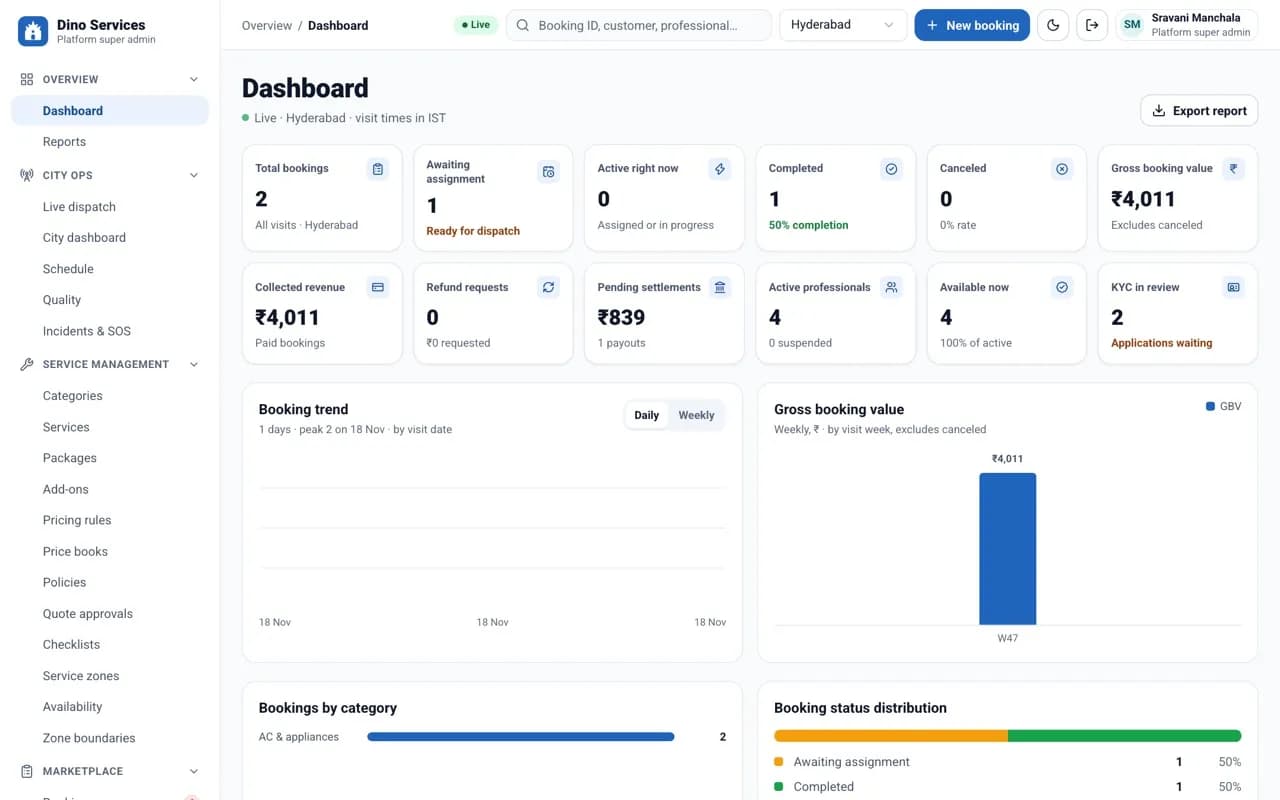
This guide walks through the order in which to set up an online home services business, using Dino Services as the reference platform. Dino Services is a white-label home services marketplace from TechDino with a customer website, customer and partner apps for Android and iOS, and an admin and City Ops console. You can open the live demo at dinoservices.techdino.in.
Step 1: Price a small catalogue for one city
Start with the five to ten services you already do well, such as AC servicing, deep cleaning, switchboard repair and tap replacement. Give each one a fixed price and a short list of what is included. Fixed prices make online checkout possible, and a written scope gives the professional and the customer the same expectation before the visit.
In Dino Services, prices live in a city price book with draft, publish and archive states, so a second city can have its own rates later. Add-ons such as an extra fan point or a gas top-up form the approved extra-work price list that professionals quote from during the visit.
Step 2: Map service zones and capacity
Decide which pincodes you serve on day one and how many visits each time slot can take. Cities, pincode zones, capacity and availability are configured in the console, and checkout only offers addresses inside served pincodes. A slot is held for ten minutes while the customer pays, which stops two customers taking the last opening at the same time.
Step 3: Onboard and verify professionals
- Collect identity documents, bank details and background check results through partner KYC review.
- Record each professional's skills so dispatch only offers suitable jobs.
- Set working hours and time off in the partner app calendar.
- Explain the start code, photo checklist and extra-work quote rules before the first job.
Step 4: Run dispatch from one screen
New bookings appear on a live dispatch map with professionals ranked for each job. Staff can send an offer by hand or let the system auto-assign. The professional sees the service, time, area and earnings and accepts before a timer ends; the full address is shown only after acceptance. A schedule board shows each professional's day, and a quality queue collects low ratings, incidents and SOS alerts.
Step 5: Protect every visit with proof
| Moment | What the platform records | Why it matters |
|---|---|---|
| Arrival | Four-digit start code shared by the customer at the door | The job cannot start unless the professional is present |
| During work | Checklist plus before and after photos | Evidence for quality reviews and complaints |
| Extra work | Itemised quote from the approved price list | The customer approves or rejects in the app before work begins |
| Completion | Customer confirmation, signature and GST invoice | A clear record for warranty claims within 30 days |
Step 6: Settle partner payouts with a second check
Customers pay by UPI, card or after the service. Finance reconciles each payment against the gateway reference, approves refunds, and generates a payout batch per professional. A second approver releases the batch, so no single staff member can send money alone. Every booking, refund and payout posts to a balanced ledger with a trial balance report.
Common mistakes when launching
- Opening too many pincodes before there are enough professionals to cover them.
- Letting technicians charge extra in cash without a recorded quote.
- Paying partners from a spreadsheet instead of a reconciled payout batch.
- Skipping the customer app languages your city actually uses; the customer app ships in English, Telugu, Hindi, Tamil, Malayalam and Kannada.
Frequently asked questions about starting a home services business
Frequently Asked Questions
Do I need my own professionals or can I use partners?
Either works. Dino Services treats every service professional as a partner account with KYC, skills and payouts, whether they are employees or independent technicians.
Can customers pay after the service?
Yes. Customers can pay online by UPI or card at checkout, or choose to pay after the service. Online payments run through your own Razorpay account.
Can I expand to a second city later?
Yes. Each city has its own price book, pincode zones and capacity, and the console offers a per-city dashboard.
Is there a live demo?
Yes. The customer website, admin console and City Ops screens are open on the demo, and Android APKs for the customer and partner apps can be downloaded from it.
The software in this article
Dino Services
Dino Services is a white-label, multi-city home services marketplace with a customer website, a Flutter customer app, a Flutter partner app and an admin and City Ops console on one backend, with slot booking, live dispatch, start codes, photo proof, extra-work quotes, GST invoices and maker-checker payouts, sold with the source code.
Explore Next
- Learn about our mobile app development services
Want Dino Services Under Your Brand?
Rebrand Dino Services with your logo and domain, or have it customized for your workflow. All quotes are customized and private.
Related Articles
Water Purifier & RO Service CRM: Managing AMC Contracts and Field Dispatch Without Per-Technician SaaS Costs
Water purification and residential filtration companies across India and the GCC process hundreds of annual maintenance visits. Self-hosted RO CRM software automates filter lifecycle alerts and technician dispatch.
Scaling Field Service Fleets: The Economics of Self-Hosted Dispatch & AMC Software
A practical guide for service contractors on eliminating per-technician software expenses while maintaining real-time job allocation and AMC tracking.